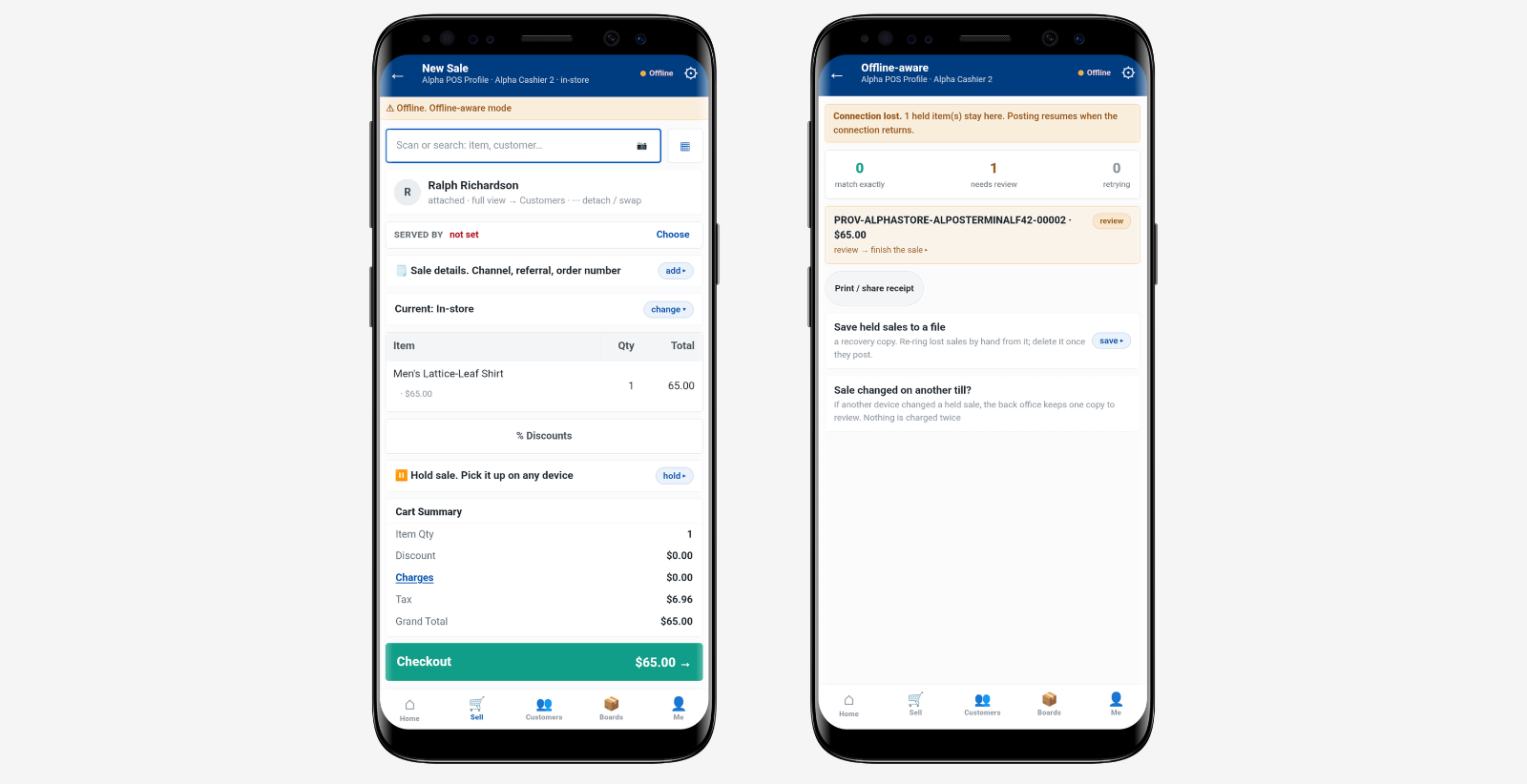
“I was just speaking to your colleague.”
At the counter, that can be the start of a customer explaining their purchase all over again. Which items they chose. How many they need. What they had already asked someone to check.
The cashier is trying to help, but they have joined the conversation halfway through.
After spending time with an employee on the shop floor, a customer naturally expects the store to remember what has been agreed. They may still need to pay at the till. They should not have to guide a second employee through the purchase from the beginning.
Moving a basket from mobile POS to the till helps carry that work forward. The first employee prepares the purchase, and the cashier retrieves it, confirms the details and takes payment.
Getting that handover right makes a difference beyond saving a few scans. It helps the customer feel that the time they spent choosing, asking questions and making decisions was time well spent.
Why a Purchase May Finish at the Till
Repeated work is a concern beyond this one checkout moment. Salesforce’s sixth Connected Shoppers Report, discussed in its 2025 retail trends article, found that 81% of retailers say inefficient processes and technology drain store associate productivity. A basket handover is one practical area to examine: when an employee has already prepared the purchase, how much of that work does the cashier have to do again?
Helping a customer choose and taking their payment do not always happen in the same place.
In a fashion store, an employee might find the right size, suggest another item and prepare the basket while the customer tries things on. The purchase then finishes at the counter, where staff can take payment, remove security tags and pack the items.
In an electronics store, the conversation may involve comparing products and choosing accessories. An employee can build the basket as those decisions are made, before the customer goes to the till.
Cash payments also need suitable equipment. If the mobile device has no cash drawer, the purchase needs to finish at a till that does.
Each device serves a practical purpose. The difficulty comes when the work done on the floor does not reach the cashier.
The customer repeats their choices. The cashier enters the products again. A question that was already settled comes up for a second time.
A mobile POS basket handover gives staff a way to continue the purchase from where their colleague left it.
This is part of the wider distinction between retail point of sale and checkout: the purchase includes the work staff do to help a customer choose, as well as the steps needed to take payment.
Moving the Basket From Mobile POS to the Till
The basic process is to hold a basket on the mobile device and retrieve it at the till. What makes it work in a store is how easily staff can connect that basket with the customer waiting to pay.
Save the Basket Before the Customer Moves
The employee checks the items and quantities with the customer, then holds the basket using the available POS function.
A quick check here can prevent confusion later. The customer may have looked at several products but decided to buy only some of them. The saved basket should reflect that final choice.
The employee then explains the next step:
“Your items are saved. My colleague at the counter will bring up the basket and take your payment.”
Holding the basket does not complete the sale. Payment and the remaining checkout steps still need to happen.
Find and Confirm the Basket
At the till, the cashier needs a reliable way to find the purchase. Use the basket reference or identification method supported by the POS, and make sure everyone follows the same procedure.
“Three shirts and a jacket” might be enough when the store is quiet. On a busy afternoon, several customers could have similar purchases.
Once the cashier retrieves the basket, they confirm the contents with the customer. This checks that they have opened the correct purchase and gives the customer a chance to mention anything that has changed.
The cashier should be able to continue without entering every product again.
Handle Changes and Take Payment
Customers often make one last change at the counter. They pick up another item, decide against a product or ask for a different quantity.
The cashier handles those changes within their permissions and confirms the revised total before taking payment.
Anything requiring approval still follows the store’s usual procedure. If an employee has discussed a special price, the cashier needs to know whether it has been authorised. The customer should not be left waiting while staff try to reconstruct the conversation.
The purchase then continues through payment, receipt and packing.
How Unified POS Supports the Handover
For this process to work, mobile POS and the till need to support continuation of the same basket.
iVendNext Unified POS provides phone, tablet and till layouts within one POS application, using shared pricing rules and customer records. An employee can hold a basket for a colleague to continue, including at a till.
This allows staff to use the layout suited to their work. The employee helping a customer on the floor uses a mobile device. The cashier continues the purchase at the counter with the equipment needed to finish it.
When evaluating iVendNext Mobile POS, ask to see the whole handover with two employees. Have one prepare and hold the basket, then ask the other to retrieve it and complete the sale.
Include customer information, promotions and any approvals your stores commonly use. Confirm what is retained when the basket is retrieved and what the cashier needs to review.
That demonstration should show how the purchase continues during an ordinary shift, including the small changes customers make along the way.
Keep the Customer Informed
Even when the basket moves correctly, the customer can be unsure about what happens next.
Do they join the usual queue? Go to a particular till? Wait for the employee who helped them?
Explain this before they leave the shop floor. A prepared basket does not automatically give someone priority over customers already waiting.
The cashier also needs to recognise that the purchase has been prepared. A short introduction helps:
“My colleague has saved your basket. Let me bring it up and check the items with you.”
Some details may still need a conversation between employees. A customer may have asked about delivery, requested a check or discussed something that requires a supervisor. Use the store’s approved process to pass on that information; do not assume the basket contains every part of the discussion.
The aim is to let the customer move to the next step without having to organise the handover themselves.
Test the Moments That Can Cause Confusion
One basket moving between two devices is a useful first demonstration. A busy store needs more than that.
Ask two employees to prepare similar purchases, then have a cashier find the correct basket for each customer. See whether the identification process remains clear when several baskets are waiting.
Try the changes staff encounter regularly:
- A customer adds or removes an item at the till.
- A quantity changes after the basket is retrieved.
- A purchase needs supervisor approval.
- A customer leaves before completing payment.
Check how staff recognise that a basket is being handled or has already been completed. They should know how to avoid processing the same purchase twice and how to deal with purchases that are no longer going ahead.
Also confirm what happens if the basket cannot be retrieved or a device loses its connection. Do not assume that offline selling includes basket handover between devices. Test that capability separately and give staff a clear fallback.
During a store trial, listen to both employees. If the cashier regularly struggles to find baskets, or the associate has to leave the floor to explain each purchase, the procedure needs attention.
Watch the customer’s experience too. Repeated explanations and repeated scanning are signs that the handover is still leaving work unfinished.
Make the Process Familiar Across Stores
Different branches may use basket handover for different reasons.
A fashion store might prepare purchases on the floor throughout the day. Another branch may mainly use the function when a customer needs to move to a till for cash payment.
The reason can vary, but the basic procedure should be familiar. Staff need to know how to identify the basket, direct the customer, confirm the purchase and handle changes.
Practise the handover with the employees who will use it together. The associate should understand what the cashier needs, and the cashier should know what has already been done.
For multi-store retailers, a consistent procedure also makes training easier when employees move between branches.
The customer may deal with two people and two devices. A clear handover helps them feel that the store has followed their purchase from the first conversation through to payment.