A fixed till can be the right choice for a modern store. A tablet can become a permanent counter fixture. And a mobile POS device can still leave an associate walking back to checkout.
The hardware tells you surprisingly little about whether a setup will work.
What matters is what happens during a sale. How many products need scanning? Does the customer pay cash? Is the associate explaining product options or processing a basket? Where does the receipt come from?
For retailers running several stores, these details become purchasing decisions repeated across every branch. A small inconvenience in one transaction can turn into a daily frustration for hundreds of employees.
Before comparing devices, look at where work starts, where it stops and what causes staff to move between the two.
Prepare Before the Outage
Store connectivity is receiving attention from retail analysts. In its January 2026 analysis, IHL Group identifies network backup and operational resilience as a key use case for 5G, helping POS and inventory systems remain operational when primary wired connections fail.
Backup connectivity helps stores retain access to live systems. Offline selling provides another option when the POS cannot reach them. Both can contribute to keeping a store trading.
Preparation happens while the device is connected. Products, prices and tax rules need to be available locally, with controls over how long that information can be used.
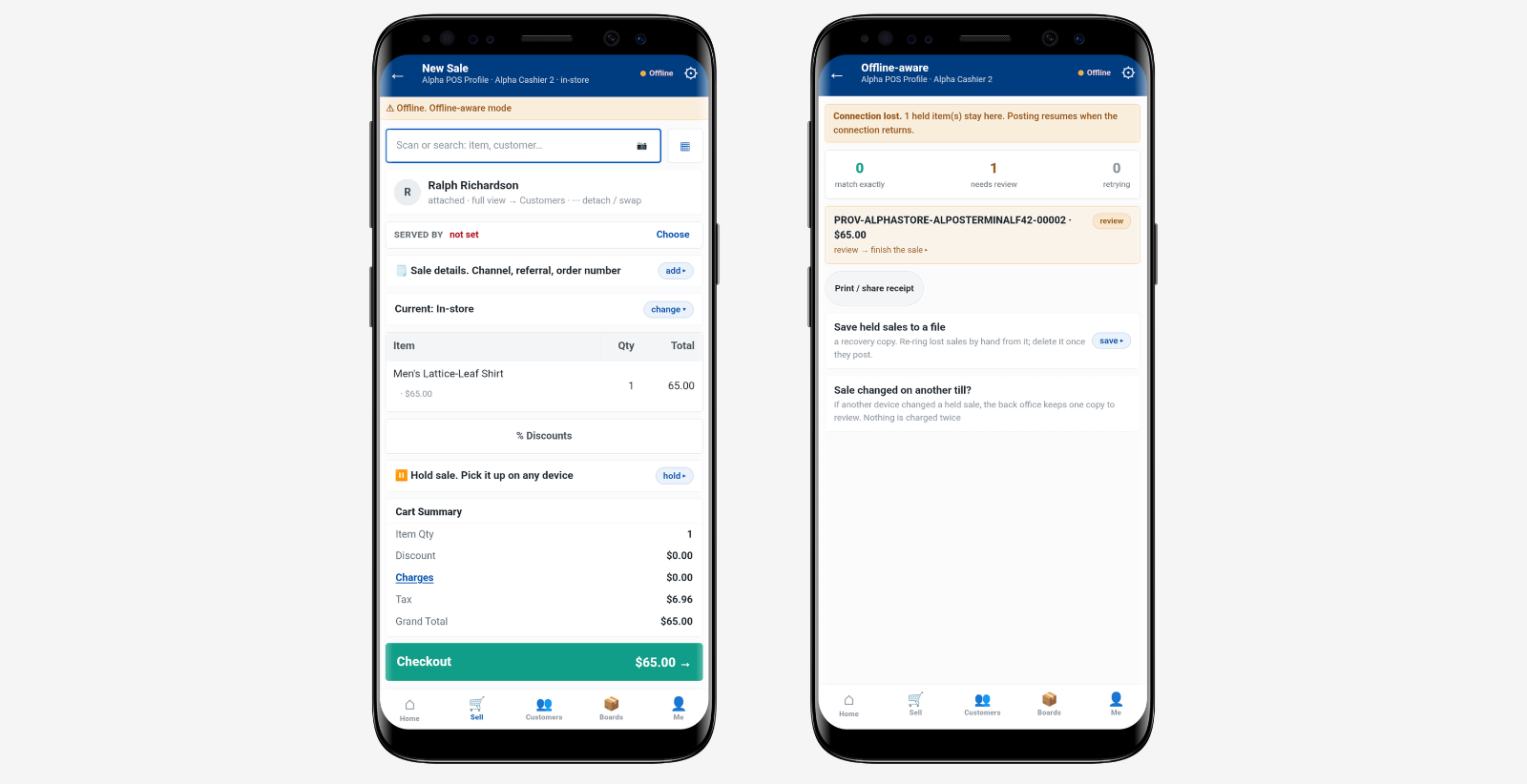
In iVendNext Mobile POS, a readiness screen shows whether the phone is prepared. Offline trading requires an open trading day, a signed-in operator, a device that has not been revoked and data within the configured freshness limits. Tax calculations and local fiscal requirements also determine whether offline selling is available.
Checking readiness at the start of the day gives staff time to address a problem before customers arrive.
What Staff Can Do When the Connection Drops
Offline selling uses information already stored on the device. Staff may be able to find products, build a basket and record a supported purchase while the connection is unavailable.
In iVendNext, scanning, searching and browsing the loaded catalogue remain available. Manual discounts can be applied within the operator’s allowance. Basket amounts are marked provisional until the sale is checked after reconnecting.
When reviewing an offline setup, look at the customer’s purchase from beginning to end.
This gives staff a practical understanding of the service they can offer. They should know when they can continue and when a purchase needs another approved route or a wait for service to return.
Payment Needs Its Own Check

The POS application and bank terminal may use separate connections. Losing access to the store’s system does not necessarily mean the terminal has also lost its ability to authorise a payment.
Confirm that arrangement with the payment provider. Employees need to recognise an approved payment and know which reference to record.
In iVendNext offline mode, the bank terminal takes the card payment and staff record the required details in POS. Cash can be taken when the trading day is running with a drawer. Offline purchases use one payment method.
Ask how the customer intends to pay early. This helps establish whether the purchase can finish at the mobile device or needs a suitable till.
After payment is recorded, the sale stays on the phone with a provisional reference. Staff can print or share a provisional slip to help match the purchase to its posted record later.
Explain what the customer has received and which reference to keep. A paid offline sale waiting to post is different from an unfinished basket saved before payment.
Recovery Is Part of the Sale
Once service returns, the queue may move normally again. Purchases recorded during the outage still need to reach the store’s system.
In iVendNext, the operator signs in again and sends their stored sales from the phone, individually or as a batch. The system rebuilds and checks each sale. Matching sales post, while exceptions go to a manager for review.
Make recovery responsibilities clear, especially when devices are shared. Each operator sends their own held sales, so completing one person’s work does not complete everyone’s.
Before closing the day, check every affected phone and operator. The close checks the current phone and operator’s held sales; it cannot confirm that all sales elsewhere have been sent.
If a shift changes before recovery is complete, pass on what remains outstanding and who needs to handle it.
Test the Purchases Your Stores Handle
An outage test should reflect the work employees do each day.
Use typical baskets, the intended payment equipment and the receipt arrangement. Include purchases that require live information so staff can practise explaining the next step.
Watch the team as well as the screen. Can employees recognise what is available? Can they give the customer a clear answer without calling for help at every stage?
Then reconnect and follow the stored sales through to posting. Include a shared phone or shift change to check that responsibilities remain clear.
For a unified POS setup, assess each device arrangement. Payment equipment and cash handling can differ between mobile devices and fixed tills.
The result should be a routine employees can follow under pressure: prepare the device, serve supported purchases and account for the sales when the connection returns.
A dropped connection shouldn’t end the customer’s visit. See iVendNext in action and discover how offline mobile POS can keep supported sales moving.