
The apps a supermarket adds to the one till
First the apps in the iVendNext App library, by iVendNext or our partners, then your ERP and web shop, then what we are building. Most library apps are free to install; a few are added to your site by your iVendNext partner. Most have a guide, and the code of our free apps is open for your partner or your own developers to build on.
For fresh food, restricted goods and the shop floor
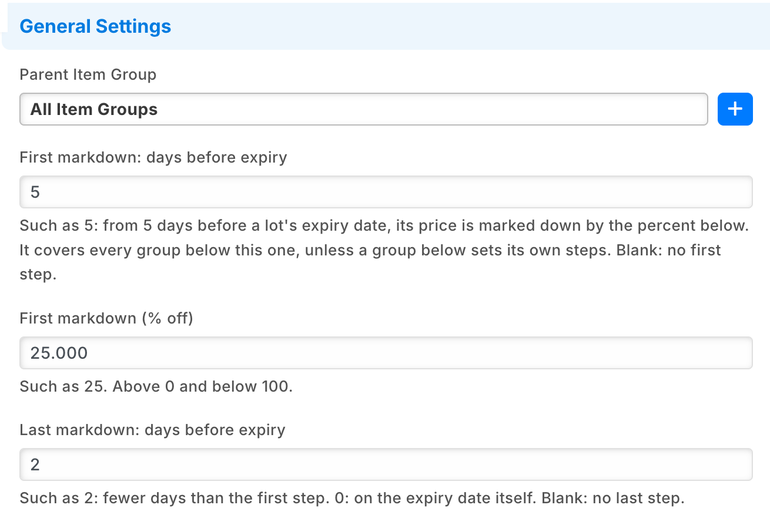
Expiry markdown
Markdowns on lots near their expiry date, by your own steps, from one press a day.
- Up to two steps on each fresh item group, such as 25% off from 5 days before expiry and 50% off from 2 days.
- Each ticked lot inside a step gets its own lower price on your selling price list until its date.
- A lot past its date, or out of stock, has the markdown taken off. A price you typed for a lot is never changed.
- The till rings a lot at its own price and prints its lot label; the cashier does nothing new.
Used by the item manager, store staff and the cashier. Shared with pharmacy.
Each press goes to a service iVendNext hosts, which writes the lot prices and keeps nothing.

Expiry and recall
Recalls, quarantine and goods-in for stock sold by lot and expiry date.
- A recall notice blocks its lots at every online till at once, and finds each store's stock of them.
- Goods-in refuses a delivery with fewer days left than your minimum, unless a supplier's letter covers it. Receipts from your ERP are flagged, never stopped.
- An expiry worklist per store, and the lots that have no expiry date.
Used by the recall officer and the stock manager. Shared with pharmacy.
In Mexico, Nigeria and Ghana, with a key from iVendNext, and its service hosted by iVendNext in the United States; elsewhere, installed and hosted for you by your iVendNext partner. Its service is sent the lots and items it checks, and keeps nothing.
Age-restricted sale check
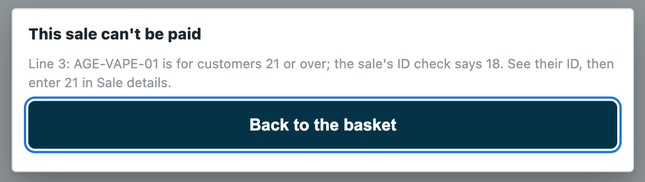
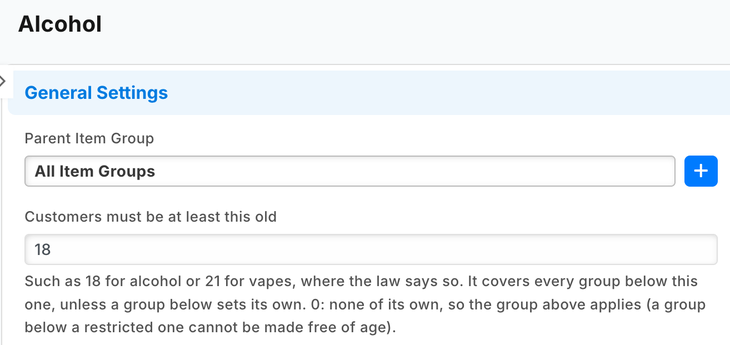
For alcohol, tobacco, vapes and other restricted goods: the customer's age checked at the scan, and held at Pay.
- An age on each item group, such as alcohol 18 or vapes 21, or on one item.
- At the scan the till shows the date of birth to compare with the ID; the check is recorded on the sale.
- At Pay a restricted line without its check is refused, even one picked from a list.
Used by the cashier and the item manager. Shared with liquor, pharmacy and hospitality.
The check runs on a service iVendNext hosts. It writes nothing, and no date of birth or ID number is kept.

Price-checker kiosk
A price checker for your shop floor: a customer scans an item and sees its price.
- Shows the item's name, picture and price for the store you choose, from your store's price list.
- Promotions are worked out at the till; the kiosk says so under every price.
- No sign-in on the tablet. Switch a kiosk off in the back office and it stops within a minute.
Used by your shoppers; set up by the store manager.
A service iVendNext hosts asks your price list for each scan. The kiosk shows only the name, unit, picture and price, and nothing is written to your shop.
Bin locations
Write down where each item sits in your store, and let the cashier ask the till.
- Your locations, back room or shop floor, their aisles, the bins in each aisle and what sits in each bin.
- A default bin for each item, and a label layout for each bin.
- A till key, Where is it?, names the bin of each item on the sale: a shop-floor bin first, else the back room.
Used by the store manager and the stock manager; the cashier asks the till.
Each press reads your bins through a service iVendNext hosts, which writes nothing. Stock moves and counts stay in your stock records.

Apps supermarkets often add
Click and collect
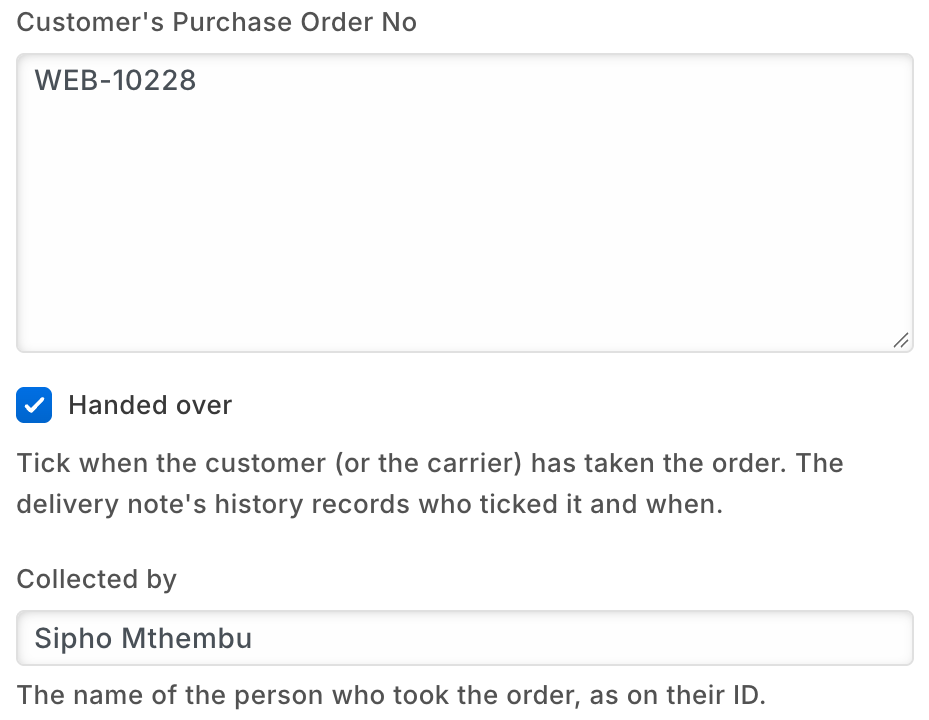
The web orders a store must pick and hand over, on one board in the back office.
- Web orders still to pick, filtered to your store.
- Orders waiting for collection, and on each delivery note who collected it and when.
Used by the store manager and the stock clerk.
Runs in your own back office. Nothing leaves your shop.
Till guard rules
Checks at Pay and at the scan, in one app. Each rule is off until you set it.
- A line at a placeholder price, such as 0.01, is refused at Pay, as is more of one item than you allow.
- A sale at or above your approval amount needs the cashier's answer, or a manager who is not the cashier.
- When an item you ticked is scanned, the till asks your question first, or says which batch to sell first.
Set up by the retail manager or the store manager.
The priced basket goes to a service iVendNext hosts, which reads your settings and writes nothing.
Coupon rules
Rules for your own coupons, checked when the cashier presses Pay.
- First purchase only: a coupon refused for a customer who has bought before.
- Only for one customer group: a coupon refused for a customer outside it.
- The cashier sees why, removes the coupon and pays.
Set up by the retail manager or the marketing manager.
The priced sale goes to a service iVendNext hosts, which reads your rules and writes nothing.
Gift card on spend
Reward a big basket with your own gift card, spendable after a hold.
- A sale that reaches your threshold earns a gift card of the value you set.
- The card becomes spendable after the hold, 24 hours unless you change it.
- A cancelled sale, or returns that take it below the threshold, void the cards it no longer earns.
Set up by the retail manager or the store manager.
A service iVendNext hosts reads your sales, returns and customers and writes the gift cards.
Payment method rules
Which payment methods each customer group may use at the till.
- On account only for your account customers; delivery-platform orders paid by the platform's method.
- At Pay the methods left out are dimmed, with your reason.
Set up by the retail manager or the finance team; the cashier sees it at Pay.
The priced sale goes to a service iVendNext hosts, which reads your rules and writes nothing.
Customers by store
At which stores each customer group may buy: account customers at their own store, trade customers at the trade counter.
- A rule per customer group: the stores or tills where its customers may buy.
- Anywhere else the cashier reads your reason, and no sale for that customer is paid there.
Set up by the retail manager; the cashier sees it when a customer is picked.
The customer and the till go to a service iVendNext hosts, which reads your rules and writes nothing.
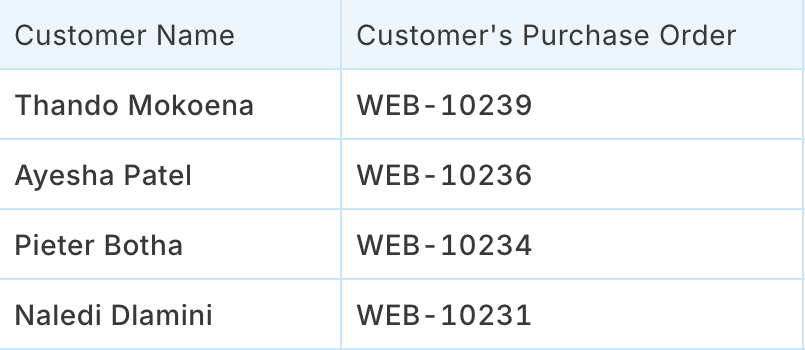
Required sale details
The details a customer group must give before paying, such as an account customer's purchase order number.
- One rule per customer group: the sale details it needs, at every till or only at the tills you choose.
- While a detail is empty, Pay is refused in your words; the cashier fills it in and presses Pay again.
Set up by the retail manager or the store manager; cashiers fill the details at Pay.
At Pay the sale goes to a service iVendNext hosts in the United States, which reads your rules, writes nothing and keeps nothing of the sale.

iVendNext Loyalty
Points on every basket, spent at the till.
- Each member is one of your customers, enrolled in a loyalty plan.
- Points build up from purchases or visits, by rules you set, and the cashier sees the balance during the sale.
Used by the cashier and the marketing manager.
Needs a key from iVendNext; your partner adds it to your site.
Counter hardware
The drawer opens, the receipt prints and the customer display shows the sale.
- Receipts print on the lane's own printer, with no print window.
- The customer display shows your welcome, sale and thank-you lines.
Used by the cashier; set up by the shop administrator.
Needs a key from iVendNext; your partner adds it to your site and tries your own hardware with you before you go live.
iVendNext Handheld
Stock work by barcode on a rugged handheld or a phone, at the back of the store.
- Receive goods, move stock between stores, count, return to the supplier and look up items.
- Queue labels to print from the back office.
Used by stock clerks and store managers.
Needs a key from iVendNext; your partner adds it to your site. It works on a live connection.
Beside your ERP and your web shop
Your ERP keeps the books. iVendNext runs the stores. iVendNext connects to SAP Business One, SAP S/4HANA, Acumatica, NetSuite and Sage X3, and your iVendNext partner connects any other ERP, a regional one included, with the iVendNext partner kit. Your partner adds the connector to your site.
SAP Business One
Your stores on iVendNext, your books on SAP Business One.
- Customers, suppliers, products, price lists and warehouses kept in step between the two.
- Your stores' sales, returns and stock transfers posted to SAP Business One, with every sync shown and any failure kept to retry.
It sends your sales and stock to your own SAP Business One server, at the address you enter.
Acumatica
Acumatica keeps your books and master data. iVendNext runs your stores.
- Items, units, prices, vendors, customers and warehouses come from Acumatica.
- Your stores' sales, returns and tenders go back to it; released purchase orders and stock moves come to your stores.
It reads from and writes to your own Acumatica, at the address you enter.
SAP S/4HANA, NetSuite and Sage X3
Your stores on iVendNext beside the ERP that keeps your books.
- iVendNext connects to each of the three; your partner sets the connection up for your company.
Any other ERP
A regional or industry ERP, connected by your iVendNext partner or your own developers with the iVendNext partner kit.
WooCommerce
Your WooCommerce web shop, kept in step with your stores.
- Products, prices, pictures and stock go to your web shop; paid web orders, payments and refunds come back.
- Shoppers can collect a web order from one of your stores.
It sends your catalogue, prices and stock to your own WooCommerce store, at the address you enter.
Being built for supermarkets
These join the App library and the till as they are finished.
Delivery marketplaces
Orders from delivery marketplaces arrive in iVendNext as orders against your store's stock, and your stock levels go back to the marketplace.
The lot rules at the till
The lot that expires first enforced at the till, a recalled lot named as recalled at the scan, and a recalled or expired lot refused on every stock document.
The library keeps growing, and anything else your partner or your own team can build with the iVendNext partner kit.
Build your own
Most of our free apps start as working code on our developer site. Your partner, or your own developers, can copy one, change it to fit your stores, or start something new, such as stock alerts with a draft transfer of short-dated stock to a clearance store.
Apps built by our partners sit beside ours in the App library, with their own name on them.
Find a partner
An iVendNext partner near you can set up your stores and these apps, build your own version of them, and support you day to day.
Talk to us about your supermarket
Tell us how your stores work. We will show you the apps that fit, and the iVendNext partner who can set them up near you.
Schedule DemoBuilding retail solutions for supermarkets? Talk to our partner team.
The App library for supermarketsGuides for supermarkets
As of 24 October 2026.
