Hardware and DIY

Hardware retail software for multi-store operations

Sell by the each, the box, the pound or the foot; a project kit that takes every part off stock; the contractor’s own prices, account and PO number at the trade counter; and the bin each item sits in, in every store of the chain.

Hardware store running iVendNext retail software
Hardware and DIY formats

Built for hardware retail

Home improvement & DIY

Large assortments, variants and project stock.

Specialty hardware

Specifications, parts and product alternatives.

Garden & outdoor

Wide assortments and seasonal replenishment.

Building supply

Bulky stock, warehouse fulfillment and delivery.

One till

One till on terminal, tablet and phone

The same iVendNext POS runs at the trade counter, on a tablet in the aisle and on a phone in the yard. Hardware needs no special screen: units, kits and variants work in the same till every industry uses. The till keeps ringing up sales when the connection drops.

The same till on three devices. A counter terminal, a tablet and a phone, each showing the same sale with its Pay button.
Daily hardware operations

Hardware POS built for complex stock

Keep variants, stock, purchasing and fulfillment aligned.

Stock across locations

  • See SKU-level stock across stores and warehouses.

  • Reserve, transfer or fulfill from another location.

  • Use stock levels and sales demand to guide replenishment.

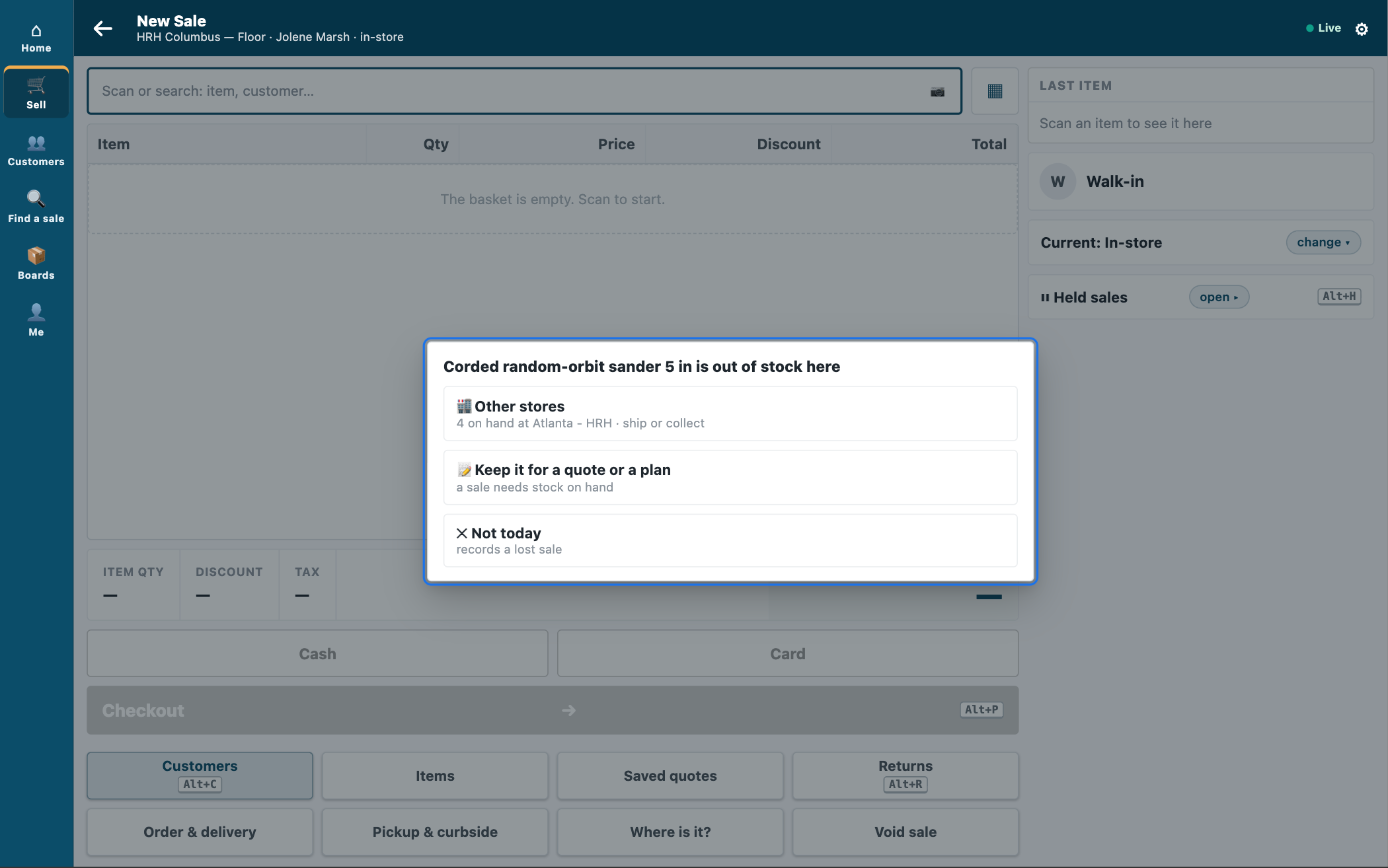
iVendNext POS offering a sander that is out of stock in this store from another store: 4 on hand at Atlanta, to ship or collect

Product variants & specifications

  • Manage color, size, material, pack type and specification.

  • Group related variants under one product.

  • Control availability and pricing for each variant.

Bulky product fulfillment

  • Fulfil bulky products from stores or warehouses.

  • Support pickup and home delivery from available stock.

  • Update inventory when products are shipped or collected.

A web order handed over in store: order WEB-10228, ticked handed over, with the name of the person who collected it blurred

Project kits & services

  • Bundle tools, materials and consumables into project kits.

  • Deduct stock for each component when a kit is sold.

  • Add related products and services to the sale.

Receiving, labels & counts

  • Receive and transfer stock with handheld devices.

  • Queue shelf and item labels on the handheld while you receive, and print them in the back office.

  • Count stock with the handheld, aisle by aisle.

Stock & replenishment insights

  • Spot stock gaps and slow-moving products.

  • Compare sales and stock movement by category and location.

  • Use demand signals to guide replenishment and transfers.

How hardware stores sell

Sell by the each, the box, the pound or the foot

The everyday work of a hardware counter, handled at the one till and in the back office.
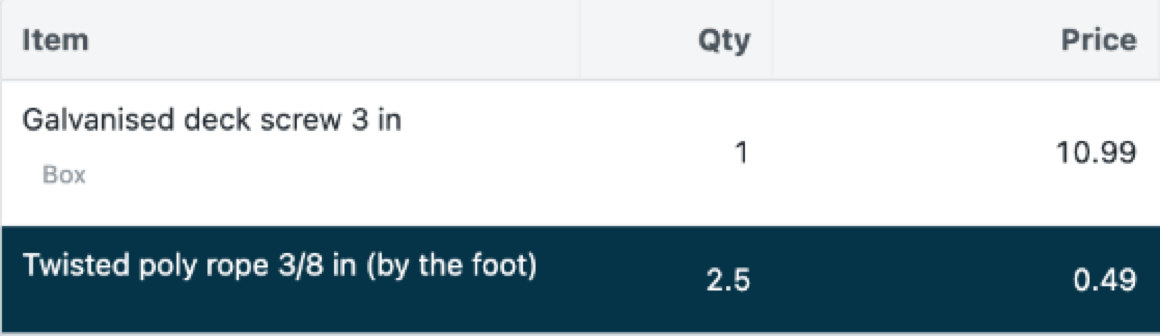
iVendNext POS with a box of galvanised deck screws at the box price and twisted poly rope sold by the foot

A box of 100 screws at the box price, and rope by the foot.

Units and packs

Each, box, case, pound or foot

Sell a single screw or a box of 100 from the same item. Each unit has its own price, and stock is always kept in the unit you count it in. Rope, chain and cable sell by the foot, part feet included.

Trade counters

Trade customers, served their way

Trade accounts buy at their own price list. Decide which customer groups buy at which stores, and which may pay on account, so the trade counter and the retail floor each keep their rules.

Bins and the price checker

Find it, then check its price

Record which aisle and bin holds each item, and let the cashier ask the till where it is. A price checker on the floor shows a customer the price of the unit they scanned.

Warranty terms

Warranties on tools

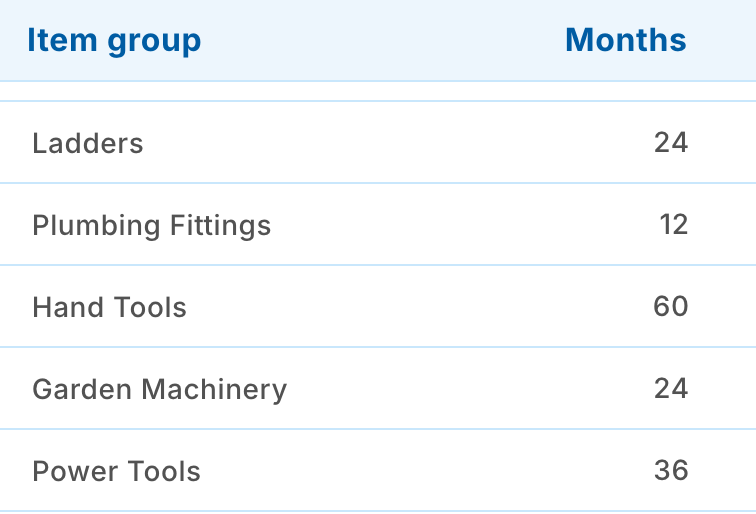
Keep a warranty term in months for each power tool or appliance, or for a whole item group, ready for a till key or service you connect.

Apps for your store

Free apps from the App library

Each app is free, installs on its own and does one job. Take the ones your stores need. Your iVendNext partner, or your own developers, can copy any of them and build on it.

Bins and their aisles: plumbing, power tools, paint, fasteners, and cement and sand in the yard

Bin locations

Write down the aisle and bin of every item, and let the cashier ask the till where it sits.

Retail and stock managers, cashiers

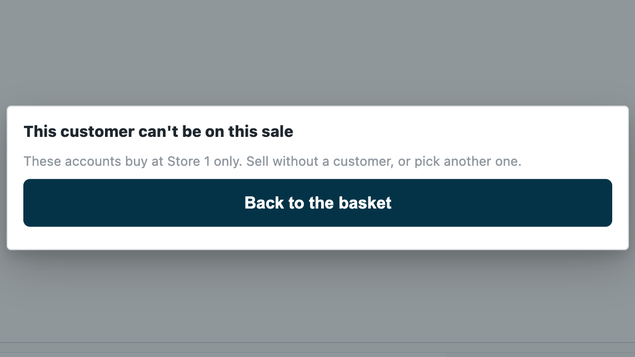
The till taking a trade customer off a sale at a store their group does not buy at, with the store's own words

Customers by store

Trade accounts buy at the trade counter, retail customers on the floor. Anywhere else the till takes the customer off the sale, with your reason.

Retail and store managers, cashiers

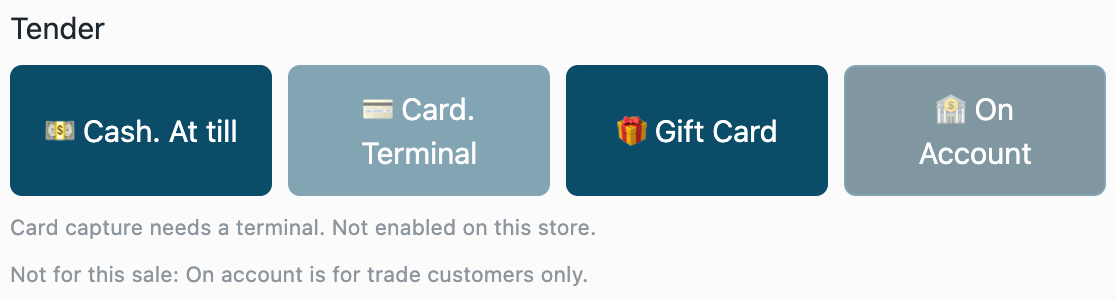
The payment methods at Pay, with On Account dimmed: on account is for trade customers only

Payment method rules

Decide which payment methods each customer group may use, such as on account only for trade account customers.

Retail managers, the finance team, cashiers

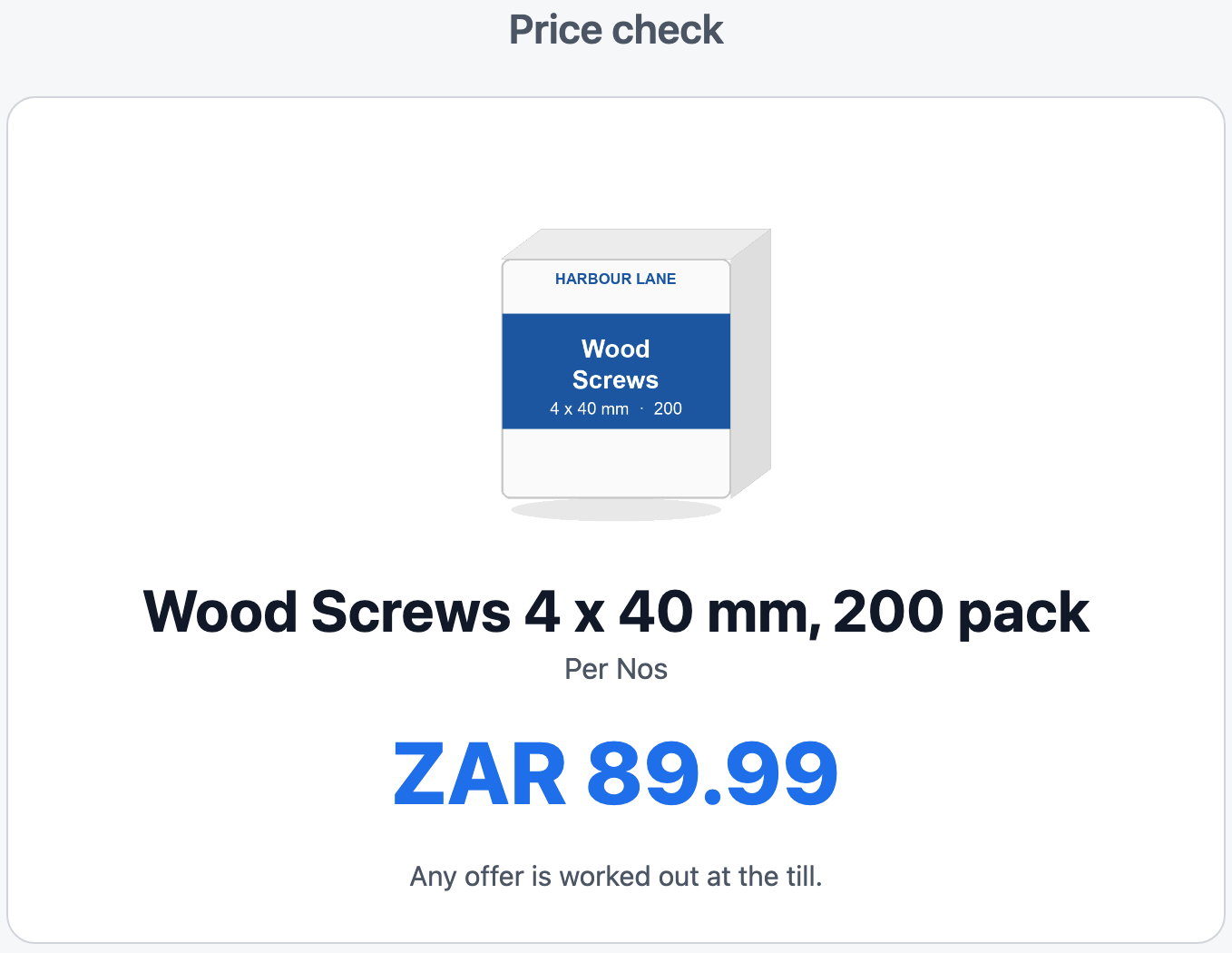
The price-checker kiosk showing wood screws, a 200 pack

Price-checker kiosk

A tablet on the floor where a customer scans an item and sees its name, picture and price for the unit they scanned.

Retail and store managers

Warranty terms in months for an item group of tools

Warranty terms

Keep each tool’s warranty in months, for one item or a whole item group, ready for a till key or service you connect.

Retail managers

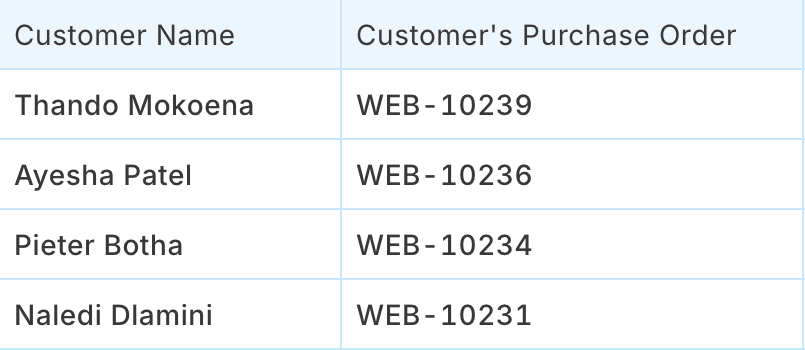
The web orders a store must pick, with each customer's name and order number

Click and collect

A back-office board of the web orders a store must pick and hand over, with who collected each one.

Store managers, stock clerks

Store and head office control

Run hardware retail with fewer gaps

See stock, purchasing, fulfillment and availability across locations.

Keep key stock available

  • Spot stock gaps by SKU and location.

  • Replenish products before stores run out.

  • Fulfil from another location when local stock is unavailable.

Move stock where needed

  • See which locations hold the required product or variant.

  • Reserve or transfer stock between stores.

  • Fulfil the order from another available location.

Help customers complete the project

  • Serve customers at the counter or on the shop floor.

  • Check specifications and stock availability during the sale.

  • Offer store pickup or home delivery for bulky products.

Keep new stores and ranges connected

  • Add locations, product ranges and online channels.

  • Manage stock, pricing and purchasing centrally.

  • Maintain one operational view across the retail network.

Works with your ERP

Your ERP keeps the books. iVendNext runs the stores.

Keep the ERP you already use for finance, purchasing and master data. iVendNext sits beside it and runs the counters, the stock in each store and the web orders.

  • SAP Business OneSAP S/4HANAAcumaticaNetSuiteSage X3

  • WooCommerce web store
    Products, prices and stock out; web orders in

Any other ERP, including a regional one, your iVendNext partner connects with the iVendNext partner kit.

Set up your way

Set up by an iVendNext partner near you, or by your own team

An iVendNext partner in your region can set up your stores, link your ERP, load your items and units, train your staff and stay with you after go-live. A team with its own developers can do the same with our guides.

  • Stores, tills, price lists and trade accounts, set up for how you sell.

  • Items with their units, packs, variants and kits, loaded from your data.

  • The apps your stores need, installed and switched on.

  • Anything your chain does differently, built on our apps by your partner or your developers.

  • Your partner supports what it delivers. We support the product.

Connect hardware retail across stores

Bring POS, stock, purchasing, variants and fulfillment together across stores.

Resources

Go deeper

How it works

The picture, the menu of apps, which hardware retailer you are, and the path to a live store.

Apps for your store

Every app for hardware stores, with screenshots and set-up guides.

Hardware and DIY brochure

Four pages to read or share.

Product documentation

Setting up a hardware store, step by step.

Hardware software questions

Hardware POS FAQs

Answers on hardware POS, variants and multi-store stock.

A hardware store POS system should connect checkout with variants, stock, purchasing, replenishment and fulfillment.

Yes. Multi-store hardware POS software can support stock visibility, transfers, purchasing, receiving and fulfillment.

Beyond POS, it can connect inventory, variants, purchasing, replenishment, fulfillment and supplier returns.

Yes. An item can sell in several units, such as each and a box of 100, each with its own price, while stock stays in the unit you count. Items measured by length or weight sell in part units, such as 8.5 feet.

Yes. A trade account buys at its own price list. With two free apps from the App library you can also decide which stores each customer group buys at, and which payment methods it may use, such as on account.

Talk to us about your hardware stores

Tell us how your stores sell, at the trade counter and on the floor. We will show you the till, the apps for your stores and the iVendNext partner who can set it up near you.

Building retail solutions for hardware and DIY stores? Talk to our partner team.

As of 24 October 2026.