
One retail operations platform for every store
CitiXsys builds iVendNext, the open retail platform. Run every store. Connect anything. Build what you need. iVendNext is the retail operations platform that runs your stores, your stock and your web store, connects to the ERP you already run, and stays open for your partner and your own team to build on.
What the platform does, job by job
iVendNext is organised the way a retail business works. Take the jobs you need: each one runs on the same stock ledger and the same customer records.
Run the store
One POS on every device, learned once. It keeps selling when the network drops, and approvals arrive on the manager's own phone.
- iVendNext POSOne POS on till, tablet and phone. Keeps selling offline.
- Loyalty and promotionsEarn, redeem and tiers at every till.
- PaymentsCard terminals and mobile money through your own provider.
- Fiscal by marketTax and e-invoicing rules, configured per country.
- Omnichannel sellingClick and collect, endless aisle and returns on one stock ledger.
Run the stock
Receive, move, count and pick on a phone or rugged scanner, from the warehouse to the shelf. Forecasts draft the purchase orders.
- iVendNext HandheldReceive, move, count and pick on a phone or rugged scanner.
- Inventory and buyingBatch, serial and expiry. Purchase orders and receipts.
- ForesightDemand forecasts that draft the purchase order.
Connect
Connectors for the ERP and the web store you run, and open APIs for everything else. One screen shows every connection.
- Integrations HubEvery connection on one screen. Mismatches closed with a reason.
- ERP connectorsSAP Business One, SAP S/4HANA, Acumatica, NetSuite, Sage X3 and many others.
- Web store connectorsWooCommerce: products, prices and stock out; orders, customers and refunds in.
- APIs and event feedLink anything else, in any language.
Build
Your partner and your own team build apps in any language, with their own AI if they like. Upgrades keep their work running.
- Extension pointsAdd rules, records and screens that stay working through every upgrade.
- DevelopersOpen kit, samples and reference apps on GitHub.
- App libraryApps for payments, local rules, WhatsApp and more.
- AI and automationAI Gateway, Foresight and CoPilot.
Where iVendNext sits beside the systems you run
iVendNext runs the stores and the stock. The Integrations Hub connects them to the ERP and the web store you already run: sales, returns, receipts and transfers go to the ERP, and items, prices, customers and vendors come back. Your partner, your own team and their AI build on top, through extension points.
SAP Business One connects through its own dedicated connector. SAP S/4HANA connectors are built for each customer on the Integrations Hub. Any other system connects through the APIs and the event feed.
Use all of it, or connect what you have
Some retailers want one system for everything. Others already run an ERP and a web store and want their stores to work with them. iVendNext is built for both.
Use all of it
Accounting, buying, stock, selling and light manufacturing in iVendNext, with the same POS and Handheld in your stores.
See the complete back officeConnect what you have
Your ERP keeps the books and iVendNext runs the stores. Sales, returns and receipts post to your finance system, and every connection shows on one screen.
See the Integrations HubBuild what is missing
When your business needs something special, your partner or your own team builds it on documented extension points, and the next upgrade keeps it running.
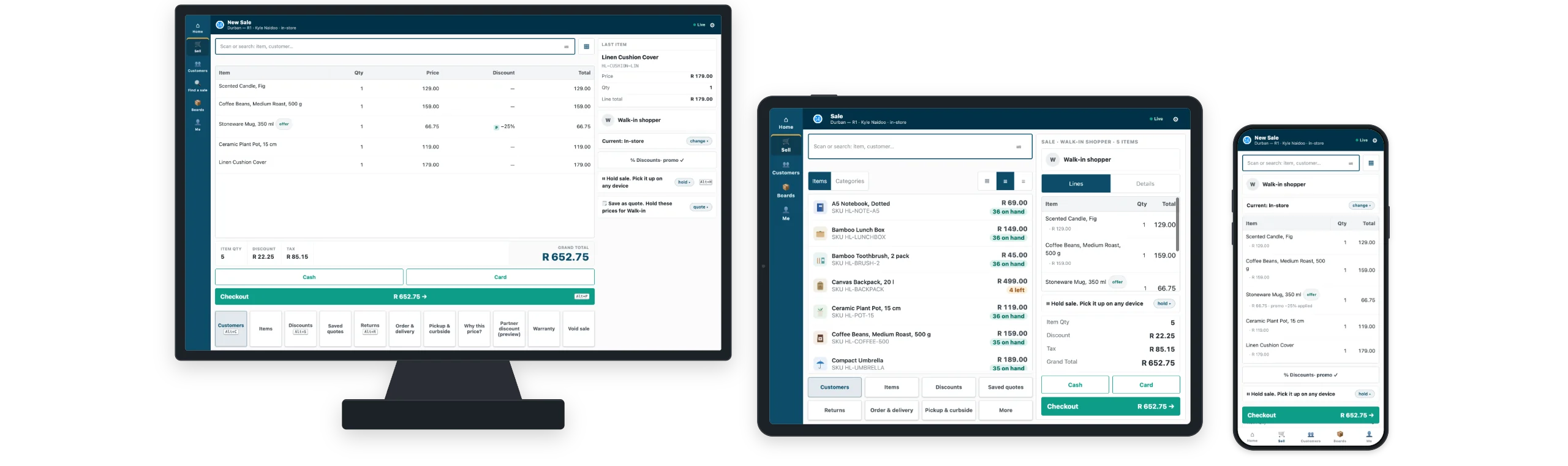
See how building worksiVendNext POS on till, tablet and phone
The same iVendNext POS runs on a counter till, a tablet and a phone, so staff learn it once. Sell, return, park and recall, take loyalty and promotions, and send a discount over the limit to the manager's own phone. When the network drops, the till keeps selling and catches up when it returns.
See iVendNext POS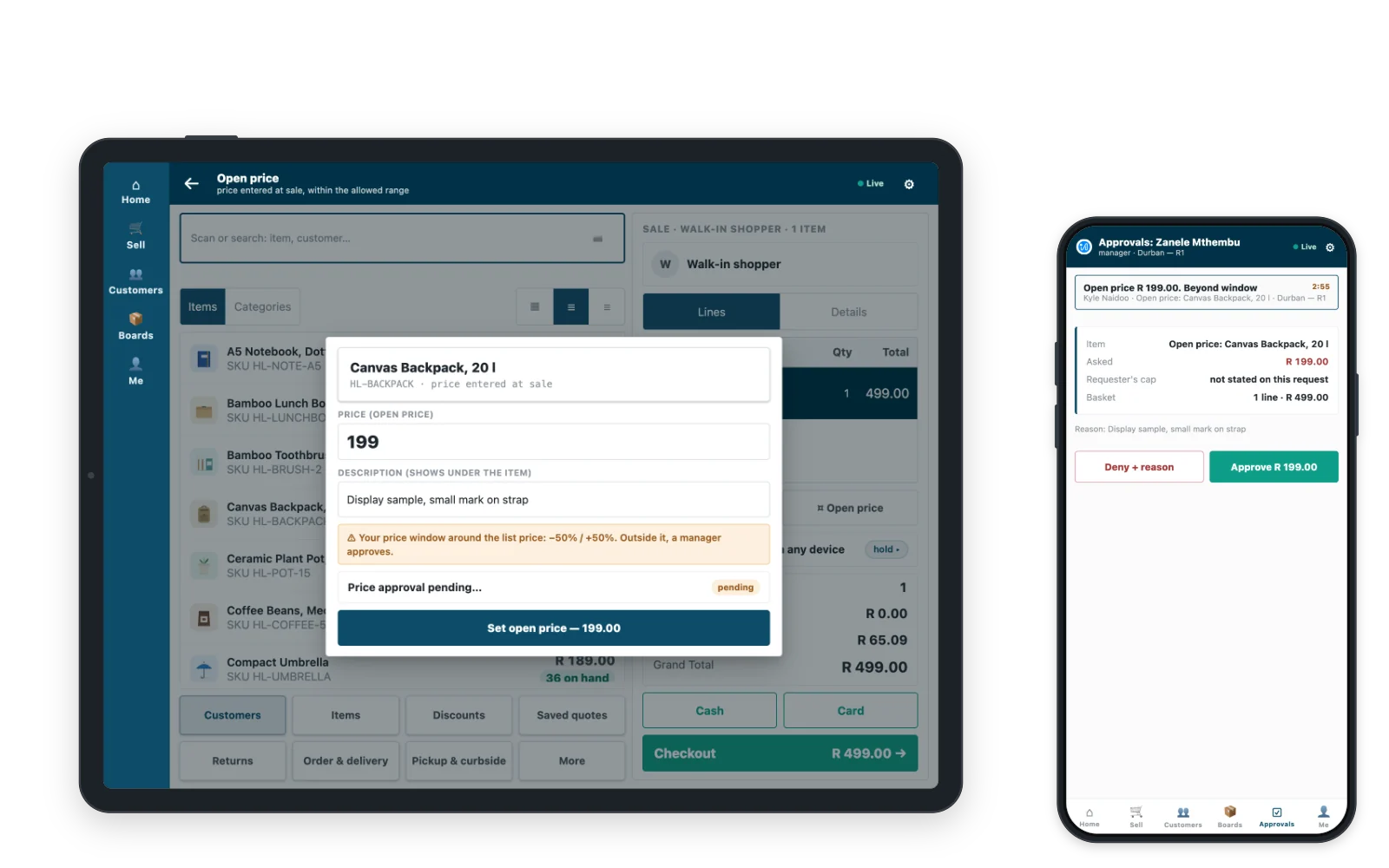
iVendNext Handheld, from the warehouse to the shelf
Receive deliveries against the purchase order, move stock between locations, count shelves, pick, pack and deliver, on a phone camera or a rugged scanner. Every movement is a real stock document, on the same ledger the stores sell from.
See iVendNext Handheld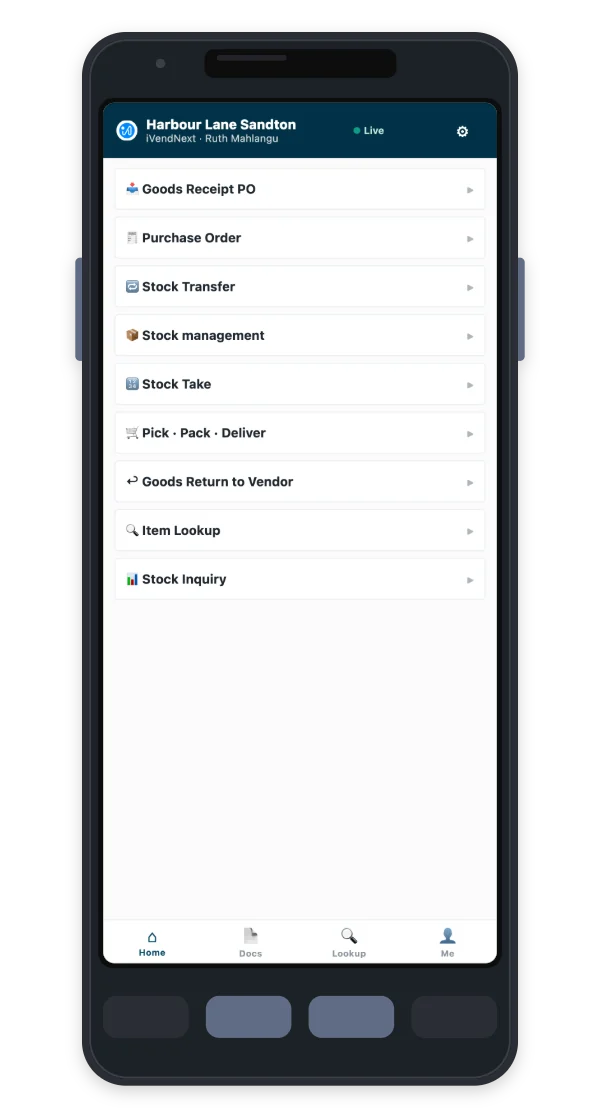
Connect the ERP and systems you already run
Connectors for SAP Business One, SAP S/4HANA, Acumatica, NetSuite, Sage X3, WooCommerce and many others. Every connector reports to one hub, so your team sees what synced, what is waiting and what needs a decision.
Build what you need, and keep it through every upgrade
Partners and your own team add to iVendNext without changing it. Apps add, they never patch, so the next upgrade keeps their work running. Describe it. Your AI builds it. Our checks keep it safe.
- Configure. Settings, workflows, print formats and till screens in iVendNext Desk and POS Studio. No code.
- Outside app. Your own service, in any language, on your own server, using the REST API and the event feed.
- Till key. A key on the till that calls your web service and shows the cashier a message or adds details to the sale.
- Manifest. Your own records, fields, print formats, workflows and numbering, shipped as data that we install.
- Sandboxed function. Logic that runs on the till itself, even when the network is down.
App library
Apps by iVendNext for payments, local rules, loyalty, stock and more, and partners list theirs after our review.
See the App libraryDevelopers
The open kit, samples and reference apps on GitHub, and a sandbox site to build on.
Start buildingWhat changes for each person in the business
| Who | What they worry about | What iVendNext gives them |
|---|---|---|
| Owner or CEO | Growing without losing control of the stores | Open the next store on the platform you already run. |
| Finance lead | Month-end reconciliation between stores and the books | Every sale, return and receipt posts to your finance system, clean and on time. |
| Operations lead | Stores running differently, stock that drifts from the system | Every store runs the same way, and every count is real. |
| IT lead | Integration debt; customisations that break on upgrade | One hub to watch every connection. Extensions that stay working through upgrades. |
| Store manager | Queues, staff turnover, being called to the till | Staff learn one screen. Approvals come to your phone. |
| Inventory and warehouse lead | Paper receiving, slow counts, picking errors | Receive, count and pick where the stock sits. |
Retail software, for two decades
Questions about the iVendNext platform
What is a retail operations platform?
A retail operations platform runs the daily work of a retail business in one place: selling at the till, moving and counting stock, and keeping both in step with the finance system. iVendNext does this on one stock ledger across every store, and connects to the ERP and web store you already run.
What does iVendNext run in a store, in the stockroom and online?
In the store, iVendNext POS sells on a till, a tablet or a phone, with loyalty, promotions, payments and fiscal rules for your market. In the stockroom and warehouse, iVendNext Handheld receives, moves, counts and picks stock. Online orders from your web store land in the same stock ledger the stores sell from.
Can I add only the parts I need?
Yes. Use all of iVendNext as one system, or take the jobs you need and connect the systems you already have. Apps from the App library add more when you need it.
How is iVendNext different from an ERP?
Your ERP keeps the books and iVendNext runs the stores. The general ledger, payment runs, period close and statutory reporting stay in your ERP, and iVendNext posts the sales, returns, receipts and transfers your stores create. For retailers who want one system, iVendNext also offers a complete back office.
Which ERPs does iVendNext connect to?
iVendNext connects to SAP Business One, SAP S/4HANA, Acumatica, NetSuite and Sage X3, and many others. A partner connects any other ERP with the iVendNext kit, and the Integrations Hub shows every connection on one screen.
Who sets it up, and what does it cost to start?
An iVendNext partner sets it up with your team, and we introduce you to the right partner for your country. What it costs depends on your stores and the jobs you choose, so talk to us and we will show you your own stores running on it.
See your own stores running on iVendNext
Tell us how your stores, stock and systems work today. We will show you the platform with your ERP and your devices, and the partner who can set it up near you.
Building retail solutions? Talk to our partner team.
