
Café and restaurant software built on one till
Run cafés and quick-service counters on iVendNext POS today, with table service for restaurants, bars and hotels being built into the same till. Ring dishes fast, keep the counter selling when the internet drops, and take recipes off stock with food cost by recipe, beside the ERP you already own.
Built for every hospitality format
Cafés and coffee counters
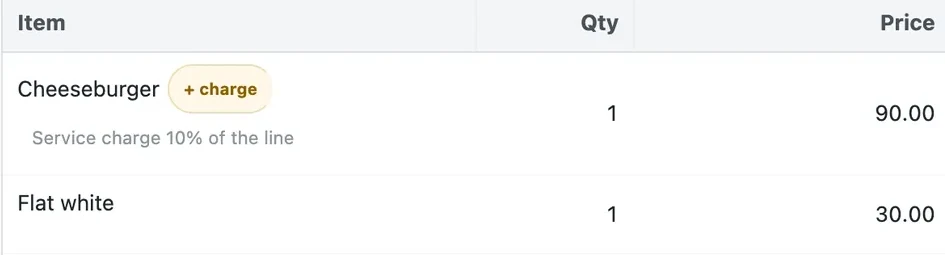
Ring drinks and food fast, add the service charge by itself, and keep selling offline.
Quick service
Counter orders and combos, with recipes taken off stock; call numbers are being built.
Table-service restaurants
The floor, open checks shared by every till, seats and courses, being built into the same till.
Bars
The age check at the scan and cocktail recipes off stock; tabs by name are being built.
Cloud kitchens
Several brands from one kitchen, each with its own menu and prices; delivery platforms are being built.
Hotel food and beverage
The hotel's restaurant and its retail store on one till; room charge is being built.
One till on terminal, tablet and phone
iVendNext POS is the same till for every industry, in the browser on the counter terminal, a tablet or a phone. A restaurant's screens switch on in the same app: a Table service switch for the floor and its checks, and a look for each kind of outlet, both being built. Staff learn one till, wherever they work.
POS features for restaurants and cafés
The counter, the menu, the money, the kitchen's stock and the guest, on the same till and back office as every iVendNext outlet.
Fast counter selling
- Ring dishes from a grid with photos, on terminal, tablet or phone.
- Add a note to a line: no onions, an allergy.
- Call numbers on every order are being built.

Menus, prices and deals
- Run one menu across outlets, with each outlet's own prices.
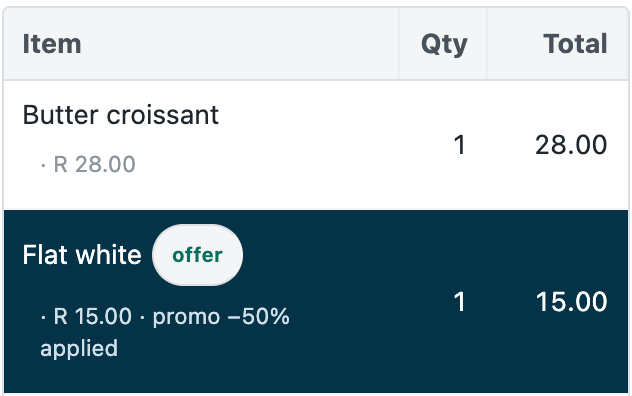
- Set deals with a time window, such as a coffee and pastry before eleven.
- Options, combos and sold-out items are being built.
Service charge and payments
- Add the service charge by itself on the dishes you choose, online and offline.
- Split a bill across cards, gift cards and house accounts, with cash on a till with a drawer.
- Tips at Pay, before the card is charged, are being built.

Recipes, stock and food cost
- Take each dish's ingredients off stock by your recipes, once a day.
- Compare food cost by recipe with the actual cost.
- Order, receive and count stock for every outlet and a central kitchen.
Allergens and age checks
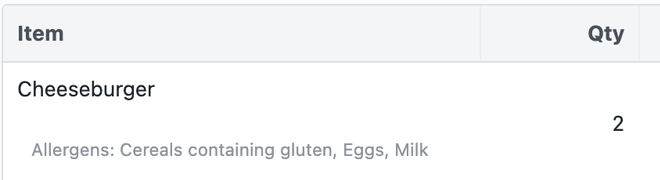
- Show each dish's allergens on the till line and the receipt.
- Check each dish against the allergens in its recipe.
- Ask for ID at the scan of alcohol or tobacco.
Tables and the kitchen
Being built into the same till:
- Open checks by table, shared by every till of the outlet.
- Send each station its ticket, on a printer or a kitchen screen.
- Seat and course the order, and split the bill by seat.
Add what your outlet needs
Free apps from the App library, each with its own card and consent. Take the ones you need and leave the rest.
Restaurant back office
Recipes take your dishes' ingredients off stock with one press a day; allergens on the till and receipt; food cost by recipe against actual.
Age-restricted sale check
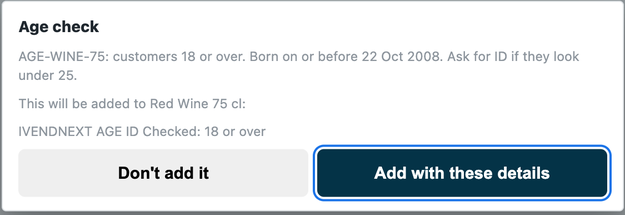
For alcohol and tobacco: the till shows the date of birth to check at the scan, records the check on the sale, and refuses Pay without it.
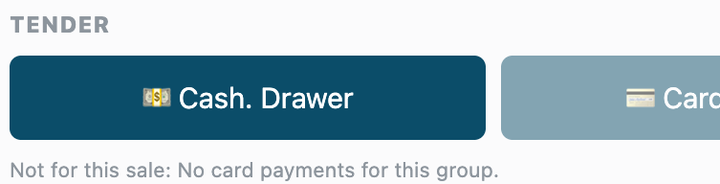
Payment method rules
Delivery-platform orders paid by the platform's method, house accounts only for account guests. Other methods are dimmed at Pay, with your reason.
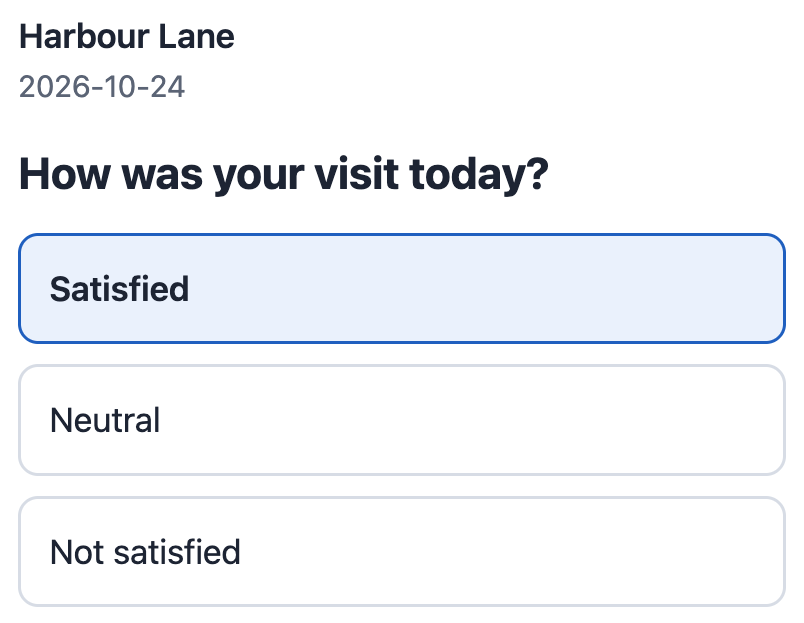
Post-sale feedback
Ask each guest how their visit was. Your message after the sale carries a link; the guest taps one of three answers, and you see the answers by outlet.
Being built: a kitchen display, reservations and the waitlist, guest ordering, and room charge. The library keeps growing, and anything else your partner or your own team can build with the iVendNext partner kit.
Keep service moving and margins in view
Keep the counter moving
- Sell through an internet outage; the sales post when the connection returns.
- Sign in by PIN, and lock the till between orders.
- Give a till to a server on a phone or tablet.
Know your food cost
- See food cost by recipe against actual, as a share of sales.
- Find waste and stock gaps from counts and issues.
- Read sales by item, till user and time of day.
Protect guests and licences
- Put allergens in front of staff at the till and on the receipt.
- Refuse Pay on alcohol or tobacco without the ID check.
- Audit every void, discount and refund.
Run every outlet on one system
- Run cafés, counters and a hotel's retail store on one till.
- Cook for several brands from one kitchen's stock.
- Close each day with shift reports for every till.
Your ERP keeps the books. iVendNext runs the restaurant.
Your stores' sales go to your ERP, and items, prices and customers come from it.
Set up by a partner near you, or your own team
An iVendNext partner in your region sets up your outlets, your menu, your kitchen hardware and your links to delivery and hotel systems, trains your staff and supports what it delivers. A team with its own developers can do the same. Either way, the apps in our library are free to copy and extend for the way your group works.
Read more
Hospitality on iVendNext
What a café or quick-service counter runs today, in the product documentation.
Set up a café or quick-service counter
The store, the dishes, the service charge, the till, the staff and offline selling, step by step.
Apps for hospitality
Every app in the App library for restaurants, bars and kitchens.
Restaurant POS software FAQs
Straight answers on the counter, the kitchen and offline selling.
What should a restaurant look for in POS software?
Fast ordering at the counter and the table, a service charge and tips handled the way your market expects, recipes and food cost in the back office, and a till that keeps selling when the internet drops. It should also connect to the accounting system you already use.
Can iVendNext keep selling during an internet outage?
Yes. The counter keeps selling dishes, with the service charge set on them, paid in cash or by card. When the connection returns, the cashier reviews the sales and posts them.
Does iVendNext handle tables and the kitchen?
Tables, open checks, seats and courses, kitchen tickets and a kitchen display are being built into iVendNext POS, behind a Table service switch. Today a café or quick-service counter runs on it, with recipes, allergens and food cost from the Restaurant back office app.
Talk to us about your restaurant
Tell us how your outlets work. We will show you the till, the apps and the iVendNext partner who can set it up near you.
Building retail solutions for restaurants? Talk to our partner team.
As of 24 October 2026. The App library keeps growing.
