
A fashion store is a shop with more sizes than most.
iVendNext runs the shop: the till, the stockroom, the price list, promotions, loyalty and returns. It already knows a style in every size and colour, so a fashion store is set up, not rebuilt. Apps from the App library add click and collect, coupon rules and more. You keep the ERP you already own.
We run the shop. Fashion is how you set it up.
Your ERP knows what your stock is worth and what you have on order. Which size the customer wanted, which store had it, whether the jacket came back for a different colour: that happens at the till and on the shop floor, so it belongs with the till. iVendNext is the retail layer beside your ERP.
Nothing in iVendNext is rebuilt for fashion. Styles with their sizes and colours, returns, exchanges and promotions are part of the shop; apps from the App library add the rest. Around it all is the work that makes it yours: setting it up, connecting your ERP and web shop, and building what your chain needs on top of our apps. An iVendNext partner can do that for you, or your own team can.
Your ERP and web shop stay where they are. The till sits on the shop, and the apps plug into both. Inside the dashed line is what your iVendNext partner, or your own team, sets up and extends.
A menu, not a bundle
Most of what a fashion store needs is in the till and the shop already. The App library adds the rest, one app at a time. Take what your stores need and leave the rest. There is no separate price for fashion.
In the till
Sizes, colours and styles
Till and shopOne product, every size and colour, each with its own stock and price.
- A style carries its attributes, such as size, colour, fit or fabric, and a variant for each combination.
- Scan the style at the till and the size and colour grid opens; pick the one the customer wants.
- Each variant has its own barcode, stock and price, and sells offline as its own item.
- From Acumatica, items arrive with their size and colour grids.

- Who uses it
- The merchandiser sets up styles; the cashier and floor staff sell them.
Returns and exchanges
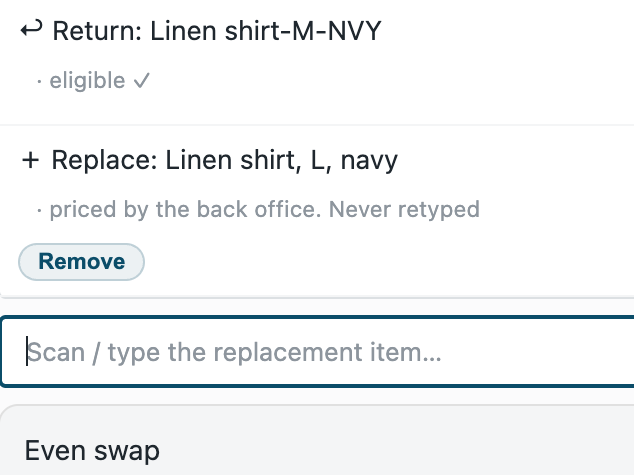
TillThe jacket comes back in M and leaves in L, in one visit.
- Return from the receipt, all of a line or part of it. Stock goes back and the money follows the original sale.
- Return days set per product, and products marked as not returnable.
- Exchange in the same sale: the returned piece and the new size side by side, and only the difference is paid or refunded.
- A return without the receipt needs a manager's approval.
- A gift receipt with no prices, set up as a print layout.
- Who uses it
- The cashier; the store manager approves exceptions.
Stock across stores
TillOut of a size here? Find it and keep the sale.
- The out-of-stock sheet shows the other stores that have it, suggests alternatives, or records a lost sale.
- Order it from another store: it is delivered to the customer or collected, and the pickup board lists what is waiting.
- High-value pieces can be sold by serial number.
- Who uses it
- Floor staff and cashiers; the collecting store hands it over.
Promotions
Till and shopThe season's offers, the same at every till that runs them.
- Buy one get one, a fixed price for a set, a discount on the whole sale, and coupons.
- Set by date and by store, and checked when the cashier presses Pay.
- Pieces that go together offered at the till when one of them is scanned.
- Who uses it
- The marketing manager sets them; the till applies them.
In the App library
Click and collect
The web orders a store must pick and hand over, in Desk, and who collected each one. Nothing leaves your shop.
Store manager, stock clerkAlso serves electronicsCoupon rules
A coupon for a first purchase only, or only for one customer group, checked at Pay. Runs on a service hosted by CitiXsys, the company behind iVendNext, which reads your rules and writes nothing.
Retail manager, marketing manageriVendNext Loyalty
Points earned on purchases and spent at the till, with the balance shown during the sale. Installed by your partner.
Cashier, marketing managerCustomer-owned loyalty
Your own tiers and cash back, kept in your iVendNext; a member's plan and cash back on a till key. Installed with a key; a service hosted by CitiXsys reads new customers and sales to work out cash back.
Retail manager, store managerGift card on spend
A sale over your threshold earns your own gift card, spendable after a hold. Returns void the cards they no longer earn. A service hosted by CitiXsys reads your sales, returns and customers and writes the gift cards.
Retail manager, store managerLucky draw
Every so much spent is one entry; after the last day one press draws the winners fairly, one prize per customer. Runs on a service hosted by CitiXsys in the US.
Lucky draw manager, cashierTill guard rules
No line at a placeholder price, a most per line, a manager for a large sale, a question when a flagged item is scanned. A service hosted by CitiXsys checks the sale; it reads your settings and writes nothing.
Retail manager, store managerBin locations
Locations, aisles and bins in each store, and a till key that tells the cashier where an item sits. Each press sends the sale, the cashier's email and the customer's name to a service hosted by CitiXsys, which reads your bins and writes nothing.
Retail manager, stock managerAlso serves hardware, electronics, groceryPrice-deviation audit
Every line sold below its price list by more than your threshold, recorded for the store manager to review. A service hosted by CitiXsys reads each booked sale and keeps none of it.
Store manager, retail managerForesight
Forecasts for stock, sales and cash from your own data; a purchase order drafted when stock runs low, for your team to review.
Buyer, store manager, finance teamiVendNext Handheld
Receive goods, move stock between stores, count, queue labels to print, pick and pack, by barcode.
Stock clerk, store managerWhatsApp messages
Order confirmations, receipts and campaigns through your own WhatsApp Business account.
Store manager, marketing managerSee every app with its screenshots and set-up guide.
The app map. Every app here is available today. Click and collect and Bin locations serve other industries too; the till underneath is the same for all of them.
What your fashion store uses with no app at all
These parts of the shop are set up, not rebuilt.
- Styles and variantsAttributes such as size, colour, fit and fabric; a variant for each, with its own barcode.
- Price per variantPrice lists by store or customer group, and a price for any variant that differs.
- Stock by storeEvery variant's stock in every store and warehouse, and transfers between them.
- Central purchase ordersRaised once for all stores, and received at each store.
- Bundles and setsAn outfit set up as one product in the back office, with stock taken off each piece when it sells.
- ReportsSales by item and store, stock by store, stock balance, gross profit.
- CustomersCustomer groups, past purchases on each customer's record.
- Permissions and auditTill profiles, roles, a manager's approval, the audit trail.
Four fashion retailers, four starting points
No store needs every part. Start from the retailer closest to yours, then add or drop apps against your own list of requirements.
| A sports and outdoor chain | A formalwear store with alterations | A luxury boutique group | A fashion chain with a web shop | |
|---|---|---|---|---|
| In the till and the shop | ||||
| Sizes and colours | Yes. Shoe and apparel size runs | Yes. Jacket and trousers in their own sizes | Yes | Yes. The same variants on the web shop |
| Returns and exchanges | Yes. Return days per product | Yes. Final-sale pieces marked not returnable | Yes. A manager approves exceptions | Yes. Web refunds come back too |
| Stock across stores | Yes. Seasonal ranges moved between stores | Where there is more than one store | Yes. High-value pieces by serial number | Yes. Orders filled from another store |
| Apps | ||||
| Click and collect | Optional | Usually not | Optional | Yes, with the WooCommerce connector |
| Offers and loyalty | Coupon rules, gift card on spend | iVendNext Loyalty | Customer-owned loyalty with your own tiers | Coupon rules, a lucky draw at season's end |
| Stock in the store | Handheld, bin locations | Handheld | Handheld | Handheld, bin locations |
| Buying and margin | Foresight | Price-deviation audit | Till guard rules for large sales | Foresight, price-deviation audit |
| What your partner, or your team, adds | ||||
| Set-up and extensions | Size runs loaded, the ERP link, seasonal price lists | An alterations order: measurements, fitting dates, the tailor's ticket | Customer service screens, made-to-measure orders | The WooCommerce link, the collection stores, WhatsApp templates |
From the first conversation to a live store
An iVendNext partner near you usually runs these steps with you; a team with its own developers can run them itself. iVendNext gives the product, the apps and the guides at every step.
- Fit check. Put your own list of requirements against the menu in section 2. What the till, the shop and the apps meet unchanged is ready; the rest is set-up or an extension.
- Set up the shop. Stores, tills and users, as for any retailer. Connect your ERP: SAP Business One, SAP S/4HANA, Acumatica, NetSuite or Sage X3, or any other ERP your partner connects with the iVendNext partner kit. Your ERP's master data loads first.
- Styles, sizes and colours. Your attributes (size, colour, fit, fabric), each style with its variants and barcodes, and return days per product. From Acumatica, items arrive with their size and colour grids.
- Prices and offers. Price lists by store or customer group, the season's promotions and your coupons.
- Install the apps your stores need: click and collect, a loyalty app, coupon rules, bin locations. Each has its own guide.
- Your web shop. Connect WooCommerce, map the warehouses the shop shows and the stores customers collect from, then load the catalogue.
- Train and go live, store by store: cashiers and floor staff on the till, stock clerks on the handheld, managers on approvals and reports.
- Day to day. Your partner supports what it delivers. We support the product.
Make it yours
Our apps are the version most fashion stores need. When yours works differently, your iVendNext partner, or your own developers, can copy any app in our library, change it and build what your chain needs on top. What is built for you is yours. How to make an app your own.
Alterations
An alteration ordered at the till: the measurements, the fitting date, the tailor's ticket, and the piece collected when it is ready.
Made-to-measure orders
A suit or a dress ordered to the customer's measurements, with a deposit and a collection date.
A version for your chain
Your own rules for coupons, loyalty tiers or till checks, built from our apps.
Your own reports
Size-run and sell-through views for your buyers, from the shop's own reports.
Local links
A local payment method, a delivery app, a loyalty provider or a messaging gateway for your market.
Hosting and support
Run and supported near you, by the partner who set it up.
Why fashion retailers choose iVendNext
Each reason carries its evidence.
Sizes and colours the whole way through
A style keeps its size and colour grid from your ERP to the till to your web shop: Acumatica sends the grids, the till opens them at the scan, and WooCommerce receives every variant with its own stock.
The Acumatica and WooCommerce connectors; the till's size and colour grid.
Keep your ERP
iVendNext is the retail layer beside your ERP. It connects to SAP Business One, SAP S/4HANA, Acumatica, NetSuite and Sage X3, and your partner connects any other ERP, regional ones included, with the iVendNext partner kit. Your ERP keeps the books; iVendNext runs the stores.
iVendNext's ERP connectors and partner kit.
One till for every industry
A fashion store needs no screen of its own. The same till runs on the counter, a tablet and a phone on the shop floor, so staff who move between stores or formats learn it once.
iVendNext POS in our App library.
Apps open to build on
There is no separate price for fashion, and most apps in the library are free. Their code is open: your partner, or your own developers, can copy and extend them, and an app built for you sits beside ours.
Our App library and kit terms.
Keeps selling when the connection drops
The till carries on offline, and each size and colour sells as its own item until the connection is back.
iVendNext POS offline selling.
In the App library today, and more as it grows
Every app on these pages is in the App library today. The library keeps growing as iVendNext and its partners publish new apps, and the App library's fashion page shows them as they arrive. Anything else your stores need, your partner or your own team can build with the iVendNext partner kit.
Talk to us about your fashion stores
Tell us how your stores sell, and which ERP and web shop you use. We will show you the till, the apps, and the iVendNext partner who can set it up near you.
Schedule a demo · See the apps · Build your own
Building retail solutions for fashion retailers? Talk to our partner team.
Guides for fashion and footwear storesThe iVendNext partner program
As of 24 October 2026. Every item on this page is available today.
