
iVendNext POS

One retail POS system. Every device.

iVendNext POS, the selling app of iVendNext, the open retail platform. One retail POS system runs on your counter tills, tablets and phones, so staff learn it once and sell wherever the customer is. It keeps selling when the network drops and catches up when it returns.

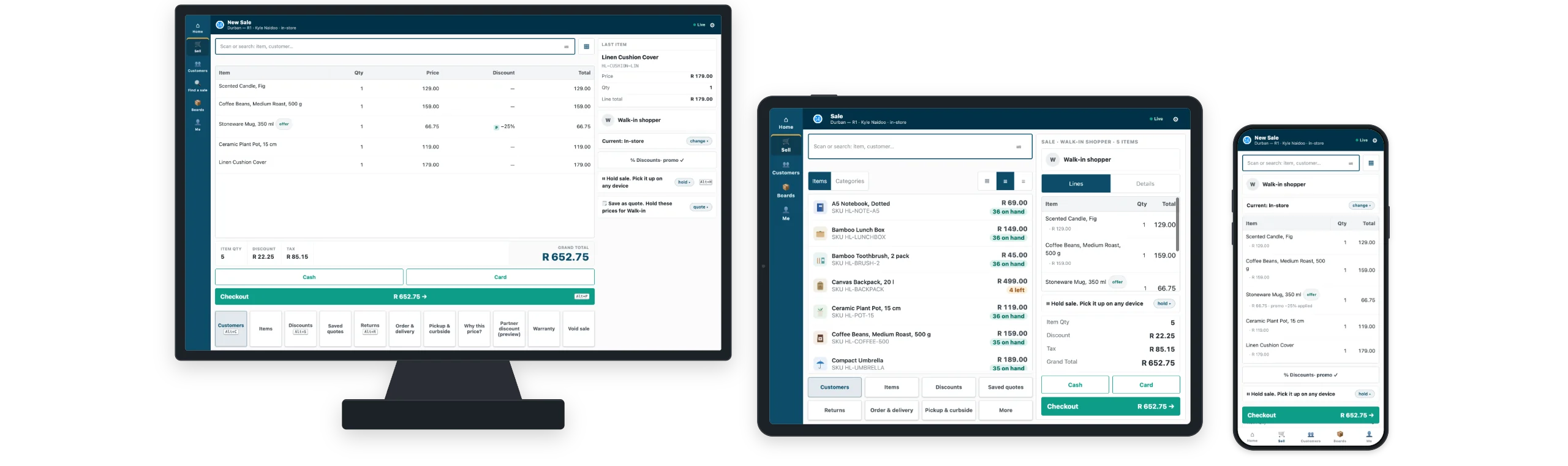
One sale in iVendNext POS on a counter till, a tablet and a phone: the same lines, customer and total on each
The same sale on a counter till, a tablet and a phone: the same lines, the same customer, the same total.
One POS on every device

Retail POS software your staff learn once

iVendNext POS lays itself out for the screen in front of you. The screens and the steps stay the same, so a cashier trained at the counter can sell from a tablet on the sales floor or a phone in the queue.

Counter till

The full counter layout, with the receipt printer, cash drawer and customer display.

Tablet

A second till at busy hours, selling and serving side by side.

Phone

Sell in the aisle or in the queue, scanning with the phone's camera.

It runs in a standard browser and installs like an app, so you can use devices you already own. One set of screens means one training plan for every store.

Sell anywhere in the store

A mobile POS system on the sales floor

On a phone or a tablet, iVendNext POS is a mobile POS system with barcode scanning through the camera, the full catalogue and live stock. Staff scan or search to sell, including variants, bundles and weighed goods, and see the customer's history, tier and loyalty as they serve.

  • Hold a sale and pick it up on any device, including the counter till.
  • Check stock in other stores and arrange collection or delivery before the customer leaves.
  • Click and collect, endless aisle and layaway with a deposit, on the same stock ledger. See omnichannel selling
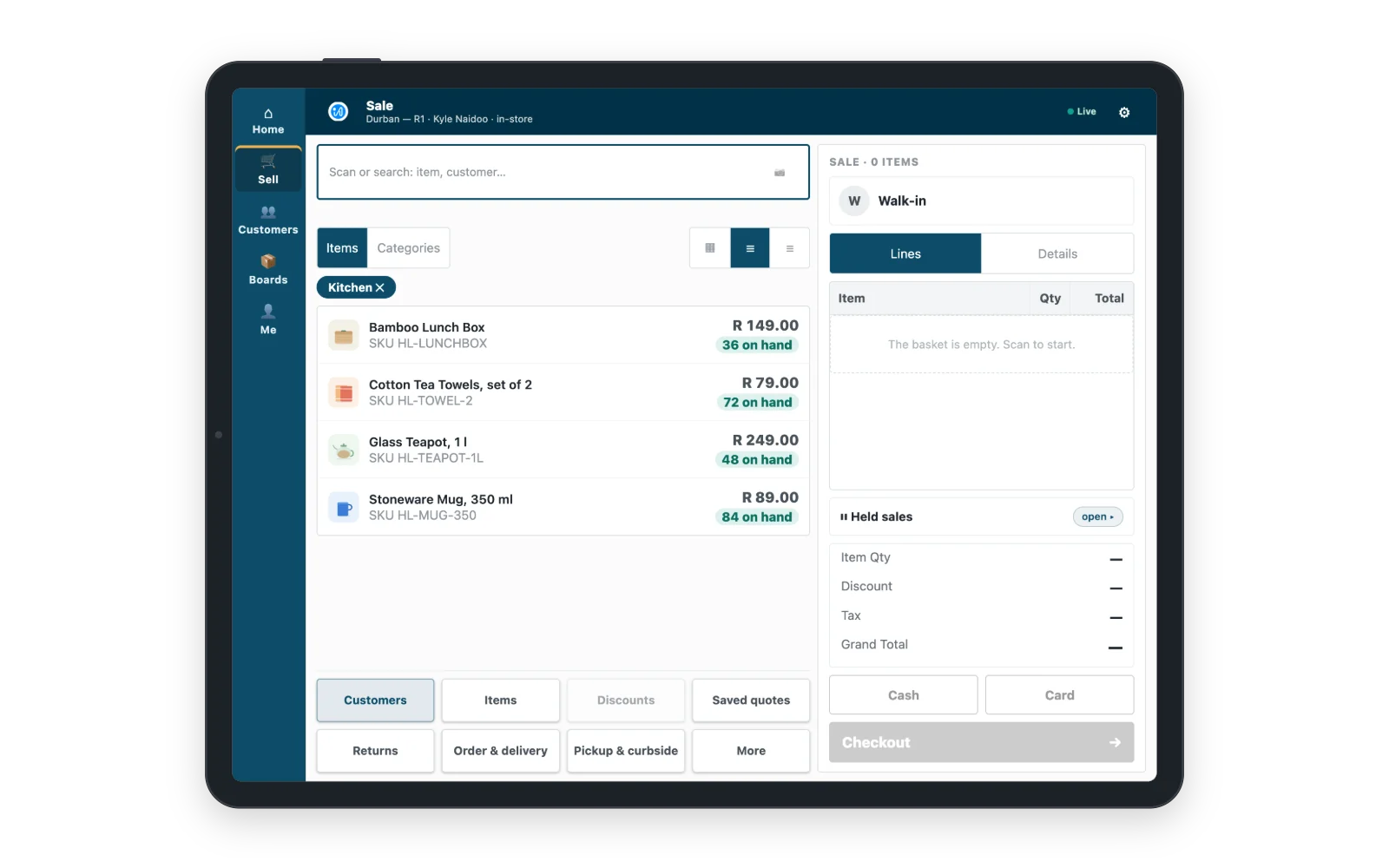
The iVendNext POS catalogue on a tablet, items shown as tiles with their prices
The catalogue on a tablet: tap or scan to add an item.
Keeps selling offline

A POS with offline mode on every till

If the connection drops, the till keeps selling. Sales are kept safely on the device and sent when the connection comes back, then checked before they post. Offline selling is switched on by default, on the counter, the tablet and the phone, with no server in the store.

Everyday sales, promotions within each person's limits and held sales carry on offline. Card terminals, returns, gift cards and points, and opening or closing the day use the connection, and the till tells staff which. Every sale made offline reaches the same books as every other sale.
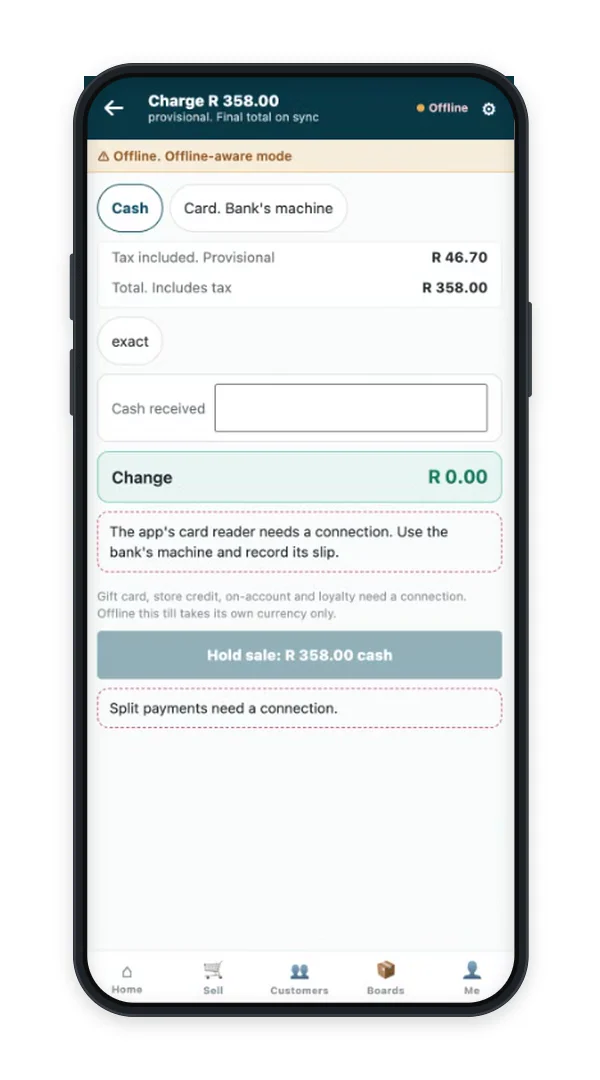
iVendNext POS on a phone selling while the network is down, with the offline band showing
A sale on the phone with the network down.
Loyalty and promotions

Loyalty and promotions at the till

Automatic promotions, markdowns and coupons apply for you, within each person's limits, and prices and tax are worked out the same way on every device. Customers join your loyalty programme at the till, earn on every sale and redeem points by your programme's rules.

See loyalty and promotions
A promotion applied to a sale on the phone, and the discounts screen showing each discount within the cashier's limit
A promotion applied at the till, and every discount checked against the cashier's limit.
Control and approvals

Approvals come to the manager's phone

Each person sees only the actions their role allows, with their own limits for discounts, price changes and voids. When a request goes over a limit, the manager approves it from their own phone, wherever they are in the store, and every decision is recorded.

  • Store sales, open baskets and waiting approvals on the manager's phone.
  • A PIN locks the till when a cashier steps away.
  • Managers enrol the devices they trust and remove a lost one straight away.
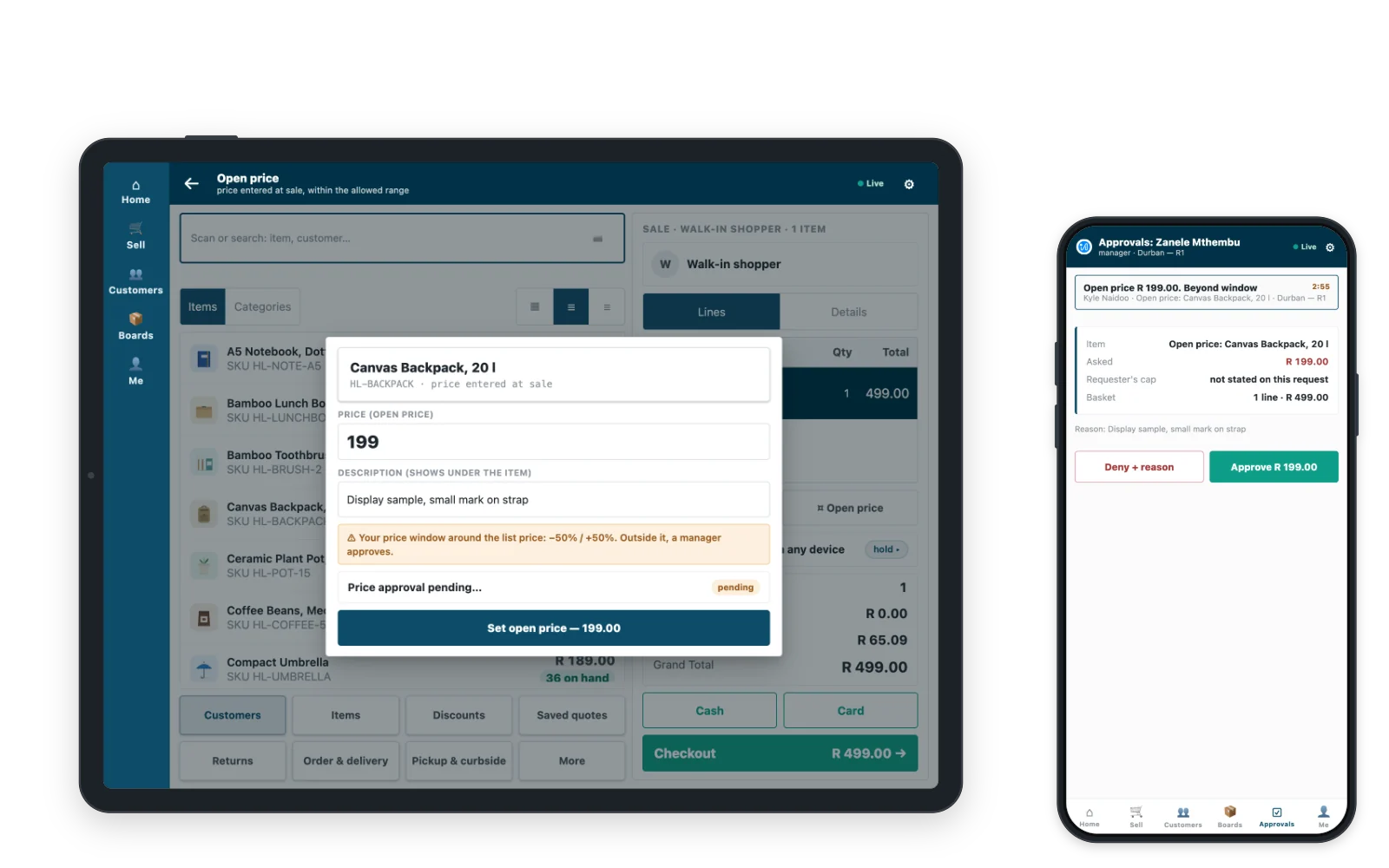
A markdown beyond the cashier's limit on the counter till, with the request waiting for a manager's approval
A markdown beyond the cashier's limit, waiting for the manager's approval.
Returns and payments

Returns, exchanges and every way to pay

Returns against the original sale

Find the sale by its number, the customer, the item or the serial number, and return or exchange the eligible items. A return without a receipt asks for the permission or approval you set.

Every way to pay

Cash, cards on your terminal, gift cards, store credit, loyalty points and account sales, with one sale split across several payments. Card terminals, mobile money and other payment gateways connect through your own provider.

See payments

Receipts your way

Printed, email or text receipts, gift receipts and reprints, in the receipt layout you choose for each store.

Fiscal by market

Fiscal rules configured for your market

Tax, receipts and e-invoicing follow the rules of each country you trade in, configured rather than custom-built. Country apps in the App library, such as the UAE tax invoice receipt, add local rules, and partners build modules for more countries on the same platform.

See fiscal by market
POS Studio

Design your own till screens

With POS Studio, a retail manager arranges, renames and recolours the till's buttons for each store, with no code. Each store gets the till its team works fastest on.

See how you configure and build
Add to the till

Apps that add to the till, and the ERP you already run

Add what your stores need from the App library. iVendNext POS posts every sale, return and payment to the ERP you run: SAP Business One, SAP S/4HANA, Acumatica, NetSuite, Sage X3 and many others.

  • Counter hardwareCash drawer, receipt printer and customer display at each counter.
  • Age-restricted sale checkThe date of birth to check at the scan, recorded on the sale.
  • Till guard rulesChecks such as a most per line or a manager for a large sale.
  • Customer code checkA one-time code to the customer's phone before points or credit are used.
  • Price-checker kioskA tablet on the floor where customers scan to see a price.
  • Gift card on spendA gift card issued when a customer spends over an amount you set.

App library

Every app for the till, by what it does, your country and your trade.

See the App library

Integrations

Your ERP keeps the books. iVendNext runs the stores.

See the integrations
Questions

Questions about iVendNext POS

What is a retail POS system?

A retail POS system is the till software your stores sell with: it rings up items, takes payment, gives receipts and handles returns. iVendNext POS does this on a counter till, a tablet and a phone, and posts every sale to the same stock ledger and books.

Does the POS work offline?

Yes. If the connection drops, the till keeps selling everyday sales, and the sales are sent when the connection comes back. Card terminals, returns, balances and opening or closing the day use the connection, and the till tells staff which.

Can the same POS run on a till, a tablet and a phone?

Yes. One iVendNext POS runs on all three, with a layout for each screen and the same steps on every device. It runs in a standard browser, so you can use devices you already own, with receipt printers, cash drawers and customer displays at the counter.

Does it work with the ERP we already have?

Yes. Your ERP keeps the books and iVendNext runs the stores, with connectors for SAP Business One, SAP S/4HANA, Acumatica, NetSuite and Sage X3, and many others. Your partner connects any other ERP with the iVendNext kit.

Which payment options does it take?

iVendNext POS takes cash, cards, gift cards, store credit, loyalty points and account sales, and splits one sale across several payments. Card terminals, mobile money and other payment gateways connect through your own payment provider.

Who sets it up, and what does it cost to start?

An iVendNext partner sets up your stores and devices with your team, and we introduce you to the right partner for your country. The cost depends on your stores and devices, so talk to us.

See a sale on your own devices

Bring your own devices, and we will show you a sale on the till, the tablet and the phone, with the network unplugged halfway through.

Building retail solutions? Talk to our partner team.