
Apps for restaurants, cafés, bars and kitchens
Each app is free in the App library, with its own card and its own consent. Take the ones your outlet needs. Your iVendNext partner, or your own developers, can copy any of them and build your own version.
In the App library
Restaurant back office
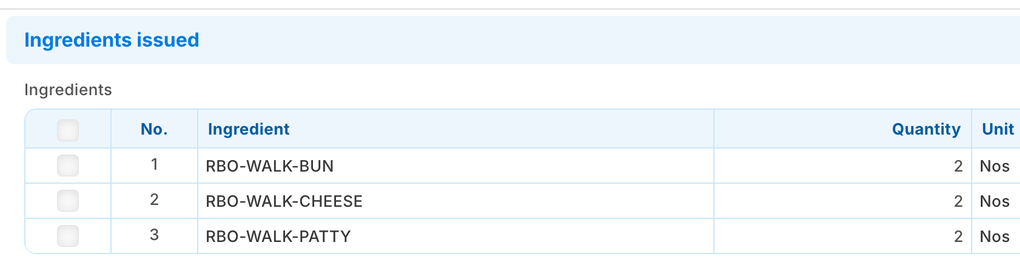
Ring dishes as today; their ingredients come off the kitchen's stock by your own recipes.
- A dish is an item with your recipe. One press a day books a stock issue per outlet of what the tills sold, never twice; offline sales are caught once posted. An outlet short of an ingredient books nothing that day and names each short part.
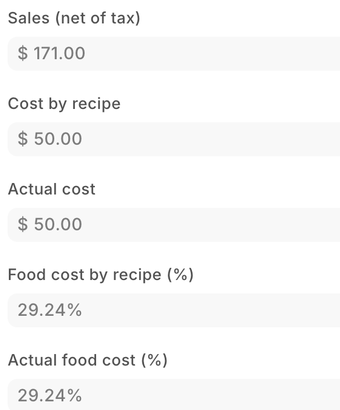
- Food cost by recipe, waste and stock count, as a share of sales. Sales by item, till user and time of day.
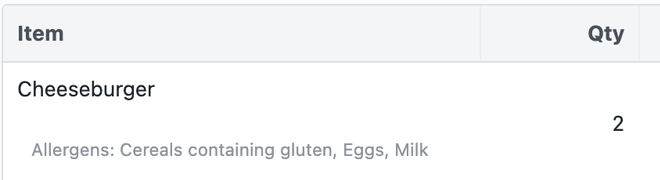
- Allergens on the till line and the receipt, and a check of each dish against its recipe's allergens.
Used by the kitchen and stock manager, finance, the item manager and the cashier. Hosted by CitiXsys: each press sends the record's name, the user and the language; the app reads your sales, recipes and stock, writes stock issues and its own records, and keeps nothing.
Get it How to set it up Build on it, for your partner or your own developers The sample
Age-restricted sale check
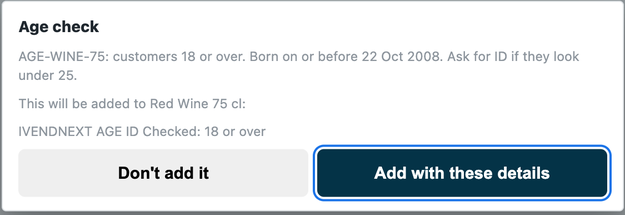
The guest's age checked at the scan of alcohol or tobacco, and held at Pay.
- An age on each item group, such as Alcohol 18, or on one item.
- At the scan the till shows the date of birth to compare with the ID, and records the check on the sale.
- At Pay, a restricted line without a matching check is refused.
Used by the cashier and the item manager. Hosted by CitiXsys in the US: at the scan and at Pay the item and the sale go to the app's service; it writes nothing, and no date of birth or ID number is kept.
Get it How to set it up Build on it, for your partner or your own developers
Payment method rules
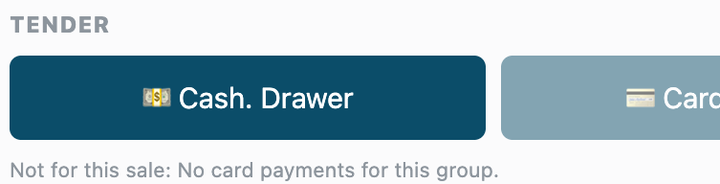
One rule per customer group, held at every Pay.
- Delivery-platform orders paid only by the platform's method; house accounts only for account guests.
- At Pay the cashier sees the methods left out dimmed, with your reason.
Used by the manager, finance and the cashier. Hosted by CitiXsys in the US: at every Pay the priced sale goes to the app's service; it writes nothing and keeps nothing of a sale.
Get it How to set it up Build on it, for your partner or your own developers
Post-sale feedback
Ask each guest how their visit was.
- A manager presses Send feedback requests; each recent guest gets your message with their own link, by SMS, email or WhatsApp where you have it set up.
- The guest taps one of three answers and may add a comment or ask not to be asked again.
- A report lists the answers by outlet.
Used by managers. Hosted by CitiXsys in the US: it reads your till sales and guests' contacts with its own user, and guests' answers pass through it to your iVendNext. Messaging guests may need their consent.
Get it How to set it up Build on it, for your partner or your own developers
Also from the App library
General apps restaurants often add:
- Counter hardware: the cash drawer, receipt printer and pole display.
- iVendNext Loyalty: points earned and redeemed at the till.
- WhatsApp messages: receipts and confirmations to the guest.
- Coupon rules and Gift card on spend.
- Till guard rules: a most per line, a manager for a large sale.
In the till today
These are part of iVendNext POS, the same till every iVendNext outlet runs.
The service charge, by itself
Set it on the dishes that carry it, and the till adds it online and offline. The cashier can also add one to a sale.

Selling offline
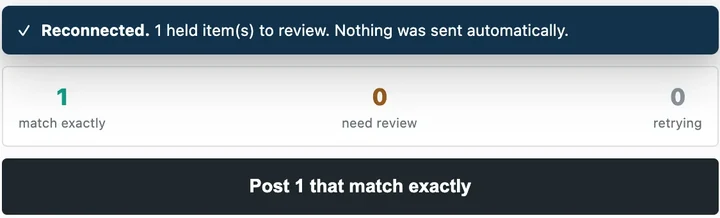
When the connection drops, the counter keeps selling dishes, paid in cash or by card. The totals show as provisional until the sale posts.

Back online
The cashier reviews the sales held while offline and posts the ones that match exactly.
The iVendNext POS guideSet up a café or quick-service counter
Being built
The restaurant's own steps, being built into the same till and the App library.
Item options and combos
No onions, extra cheese, a choice of side, priced or free; offline too. In the till.
Eat in or take away
Each sale's service mode, with its own tax. In the till.
Call numbers and sold-out items
A number on every counter order; items sold out or served by the hour. In the till.
Kitchen tickets
A ticket per station on its printer, a line held until fired, tickets when the internet is down. In the till.
The floor and open checks
Tables, covers, checks shared by every till, seats and courses, split by item or seat, behind a Table service switch. In the till.
Tips at Pay
Asked before the card is charged; the card is charged for both. In the till.
Kitchen display
Tickets on a screen per station, with timers, bump, an expo screen and a now serving board. An app.
Front of house
Reservations, the waitlist and its table ready message, deposits linked to bookings. An app.
Guest ordering
Orders by QR code at the table, at a kiosk or on the web, on to the check and the kitchen. An app.
Room charge
A hotel guest's bill charged to the room, checked with the hotel's system first. An app.
Delivery platforms
Delivery orders straight into iVendNext and on to the kitchen. A connector.
Covers, table turns and tips report
In the Restaurant back office app, from the table's checks and tips.
The library keeps growing, and anything else your partner or your own team can build with the iVendNext partner kit.
Build your own
Each restaurant app above starts from a recipe on our developer site. Your iVendNext partner, or your own developers, can copy one, change it for your group, or build a new app for what only your restaurants do. Apps built by partners sit beside ours in the App library.
Find a partner
An iVendNext partner near you sets up your outlets, your menu and your kitchen, installs the apps you choose, and supports what it delivers.
Talk to us about your restaurant
Tell us how your outlets work. We will show you the till, the apps and the iVendNext partner who can set it up near you.
Building retail solutions for restaurants? Talk to our partner team.
The App library for restaurants and cafés
As of 24 October 2026. The App library keeps growing.
