Supermarket

Supermarket retail software built for busy stores

Keep checkout moving and fresh stock under control, from weighted items and pricing to replenishment.

Cut waste and speed up checkout with a cloud POS built for fresh stock. Expiry controls and prices read straight from your scale labels keep high-volume lanes moving.
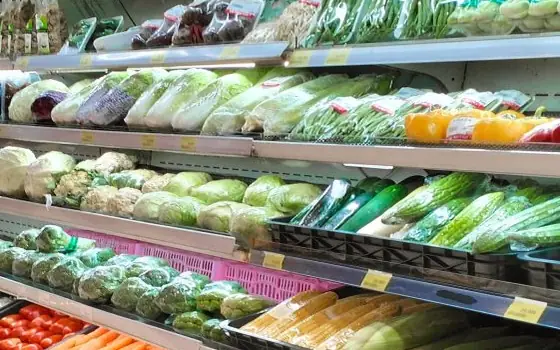
Supermarket checkout running iVendNext POS
Supermarket formats

Built for every supermarket format

Corner & convenience

Keep checkout, pricing and stock simple.

Supermarkets and hypermarkets

Manage busy lanes, large ranges and narrow margins.

Discount & wholesale

Control bulk pricing, batches and replenishment.

Express stores

Speed up scanning, weighing and restocking.

One till

One till on terminal, tablet and phone

One iVendNext POS runs every lane. Weighed items, lots and the age check are in the same app on every device, so a cashier trained at the counter can sell from a tablet on the shop floor or a phone in the queue.

Counter terminal

The full lane: scanner, scale labels, drawer, receipt printer and customer display.

Tablet

A second lane at busy hours, or the price-checker kiosk on the shop floor.

Phone

Line-busting in the queue, and the way to an item’s shelf answered in the aisle.

The same till on three devices. A counter terminal, a tablet and a phone, each showing the same sale with its Pay button.
Daily store operations

POS features for modern supermarkets

Connect tills, scale labels, shelf prices, inventory and purchasing across every store.

Expiry and fresh stock control

  • Track expiry dates and flag short-dated goods early.

  • Rotate or mark down stock before it becomes waste.

  • Stop expired lots from being sold at an online till.

The lot pick on iVendNext POS for fresh milk, oldest stock first: the lot expiring 29-10-2026 is taken before the one expiring 06-11-2026

Weighed items and scale labels

  • Scan the label your scale prints: item, weight and price in one scan.

  • Price produce, deli and meat items by weight.

  • Print a weighed pre-pack’s own label at the till.

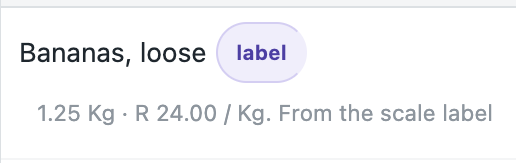
iVendNext POS with loose bananas rung from a scale label: 1.25 kg at R 24.00 a kilo, R 30.00

Variable-weight barcode processing

  • Read barcodes containing item, weight, price and quantity.

  • Process variable-weight products without manual entry.

  • Set the layout of your own codes, lot number included.

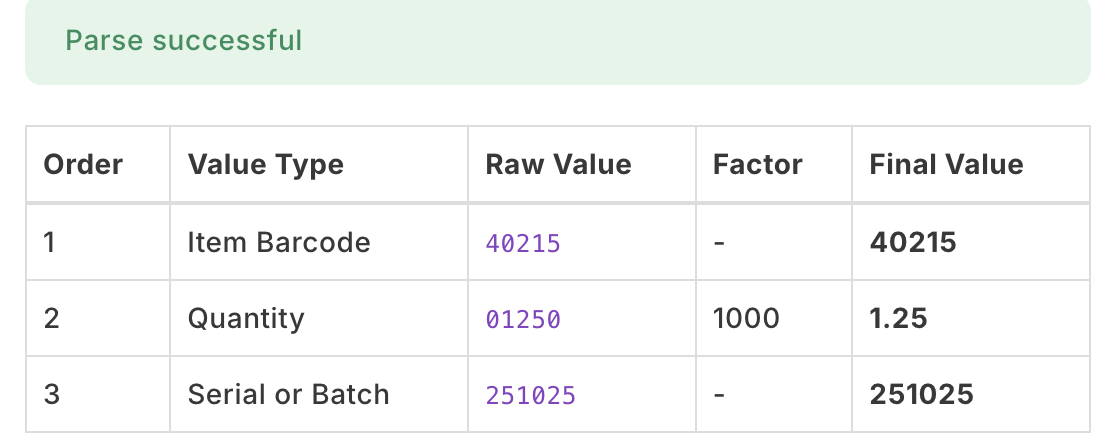
A barcode layout in iVendNext read back: the item 40215, a weight of 1.25 kg and the lot 251025 from one label

Shelf and item label printing

  • Print shelf and item labels for new stock and replenishment.

  • Print fresh labels with the current price when prices change.

  • Generate labels from a goods receipt or a stock move.

Batch and recall traceability

  • Track each batch from receipt to sale.

  • Use FIFO or FEFO rules to rotate stock.

  • Find affected products quickly during a recall.

Centralized procurement processes

  • Combine demand from stores before placing orders.

  • Create and approve purchase orders centrally.

  • Track supplier deliveries and store receiving.

Apps for your store

Apps for your store, in the App library

Small apps by iVendNext and our partners add what a supermarket needs to the one till. Most are free to install, and the code of our free apps is open for your partner or your own developers to copy and extend.

The Batch list in iVendNext Desk with three lots of fresh milk ticked and Mark down in the Actions menu

Expiry markdown

Markdowns on lots near their expiry date, by your own steps, from one press a day. The till rings each lot at its own price.

Shared with pharmacy

The till asking for an age check when a bottle of wine is scanned, with the date of birth to compare against the ID

Age-restricted sale check

The customer’s age checked at the scan of alcohol, tobacco or vapes, and held at Pay.

Shared with liquor, pharmacy and hospitality

The price-checker kiosk showing Basmati Rice 2 kg at ZAR 64.99, with its picture

Price-checker kiosk

A tablet on your shop floor where a customer scans an item and sees its name, picture and price from your store’s price list.

A recall's result: the lots blocked, the stock found in two stores and the three sales that carried them

Expiry and recall

A recalled lot blocked at every online till at once, its stock found in every store, and short-dated deliveries refused at goods-in. With a key from iVendNext in Mexico, Nigeria and Ghana; elsewhere, installed and hosted for you by your iVendNext partner.

Shared with pharmacy

Bins and their aisles: rice and pasta, tinned food, breakfast and the dairy chiller

Bin locations

Write down where each item sits in your store, from the back room to the shelf, and let the cashier ask the till.

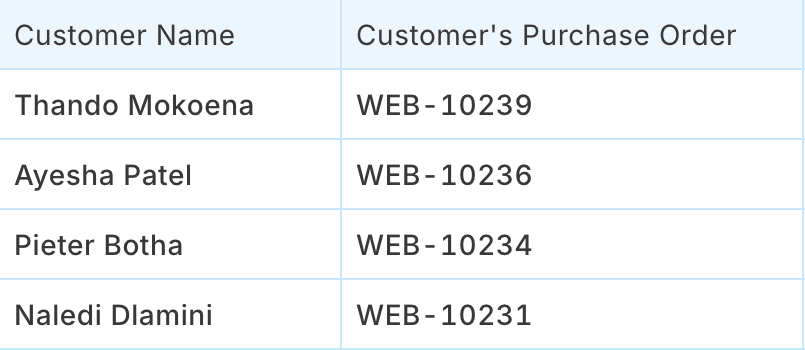
The web orders a store must pick, with each customer's name and order number

Click and collect

The web orders a store must pick and hand over, on one board, with who collected each order.

Store performance

Keep shelves available and margins under control

Use sales, waste and inventory data to act before problems reach the aisle.

Reduce spoilage and waste

  • Flag short-dated goods early for rotation or markdown.

  • Move excess stock between stores before it becomes waste.

  • Use batch-level visibility to investigate spoilage and write-offs.

Keep checkout moving

  • Scan scale labels to cut manual entry.

  • Read variable-weight barcodes for faster scanning.

  • Reprint shelf labels quickly when prices change.

Protect pricing and traceability

  • Price weighed items from the label, never by hand.

  • Trace batch-controlled goods from receipt to sale.

  • Find affected stock quickly during a recall.

Protect store standards and customer trust

  • Keep shelf labels and prices accurate.

  • Stop expired lots at the online till, before they reach the customer.

  • Trace affected batches during quality checks or recalls.

Works with your ERP

Your ERP keeps the books. iVendNext runs the stores.

Keep the ERP you already run for finance. iVendNext sits beside it and runs the lanes, the fresh stock and the shelf prices. It connects to SAP Business One, SAP S/4HANA, Acumatica, NetSuite and Sage X3, and your iVendNext partner connects any other ERP, a regional one included, with the iVendNext partner kit.

SAP Business One

Products, customers and prices in step with your stores; sales, returns and transfers posted back.

SAP S/4HANA

Your stores beside the SAP system that keeps your books.

Acumatica

Items, prices and customers from Acumatica; sales, returns and payments go back to it.

NetSuite

Your stores beside the NetSuite account that keeps your books.

Sage X3

Your stores beside the Sage X3 system that keeps your books.

Any other ERP

Connected by your iVendNext partner with the iVendNext partner kit, a regional ERP included.

WooCommerce

Your web shop kept in step with your stores’ products, prices and stock; web orders come back to iVendNext.

Set up for you

Set up by an iVendNext partner near you, or by your own team

An iVendNext partner in your region can set up your stores, your scale labels and your apps, train your teams and support you day to day. A retailer with its own developers can do the same itself.

When your stores work differently, your partner or your developers can copy any app in our library and change it to fit: your own markdown steps, your own recall routine, your own links to the systems you already use.

Bring every supermarket operation together

Connect POS, inventory, purchasing, promotions, loyalty and online orders across every store, beside the ERP that keeps your books.

Resources

Read more about iVendNext for supermarkets

How it works

The till, the apps around it, the four kinds of supermarket and how you get started.

Read how it works

Apps for your supermarket

Every app a supermarket can use, with pictures and how to set each one up.

See the apps

Supermarket brochure

Four pages to read or share.

Download the brochure

How grocery POS software keeps inventory moving

From our blog.

Read the article

The App library for grocery

Apps for supermarkets, convenience stores and quick commerce.

Open the library

Supermarket POS questions

Supermarket POS software FAQs

Straight answers on supermarket checkout, fresh stock and offline selling.

Supermarket POS software should support fast scanning, weighted items, promotions, payments, fresh inventory and multi-store control. It should also keep essential checkout functions available during connectivity problems.

iVendNext reads the item, weight and price from your scale labels and other variable-weight barcodes. It also tracks batches, flags short-dated goods and stops expired lots at an online till.

Yes. Supported sales can continue when connectivity is unavailable and synchronise when the connection returns.

No. Your ERP keeps the books and iVendNext runs the stores beside it. iVendNext connects to SAP Business One, SAP S/4HANA, Acumatica, NetSuite and Sage X3, and your partner connects any other ERP with the iVendNext partner kit.

Talk to us about your supermarket

Tell us how your stores work. We will show you the till, the apps for fresh food, and the iVendNext partner who can set it up near you.