
The apps a liquor store adds to the one till
First the apps in the iVendNext App library, then your ERP and web shop, then what we are building. Most library apps are free to install; some are installed with a key from iVendNext or your partner. Most have a guide, and the code of our free apps is open for your partner or your own developers to build on.
For restricted goods and dated stock
Age-restricted sale check
For alcohol, tobacco, vapes and other restricted goods: the customer's age checked at the scan, and held at Pay.
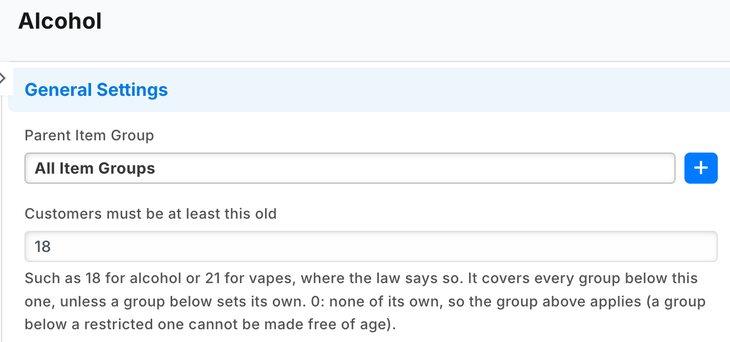
- An age on each item group, such as spirits 18 or vapes 21, or on one item. It covers the groups below it.
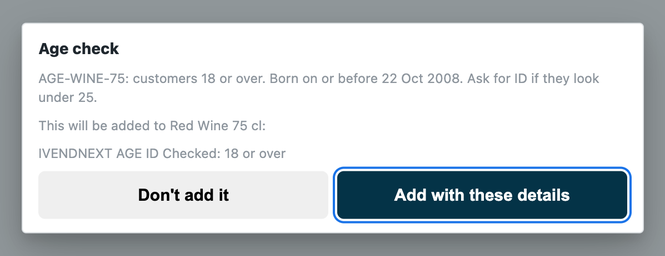
- At the scan the till shows the latest date of birth that may buy, for the cashier to compare with the ID; the check is recorded on the sale.
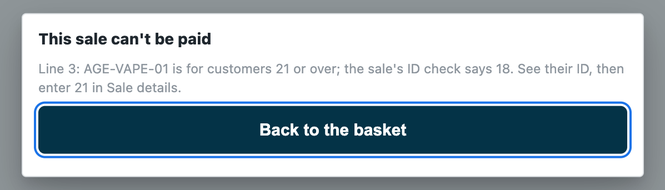
- At Pay a restricted line the sale's check does not cover is refused, even one picked from a list.
Used by the cashier and the item manager. Shared with grocery, pharmacy and hospitality.
The check runs on a service iVendNext hosts, which is sent the scanned item and the sale, writes nothing and keeps no date of birth or ID number. Offline, the sale goes on and is flagged for review.
Expiry markdown
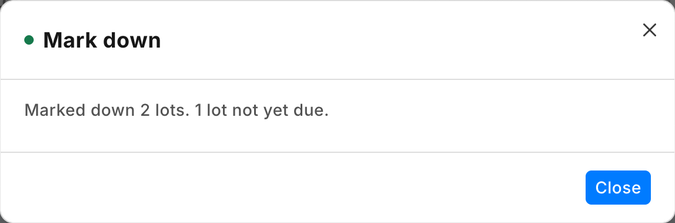
Markdowns on lots near their expiry date, by your own steps, from one press a day: for beer, cider, mixers and anything else you sell by dated lot.
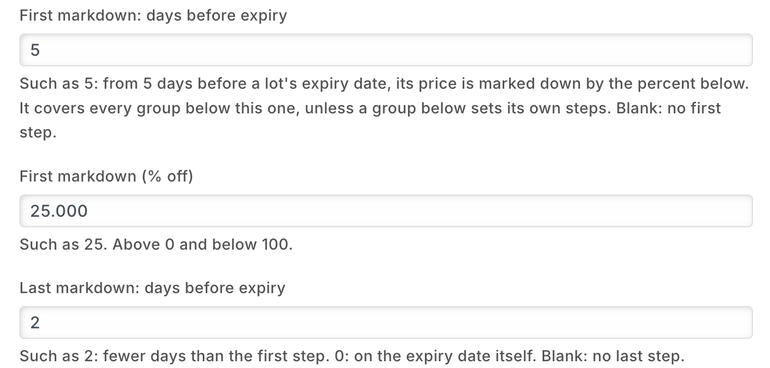
- Up to two steps on each dated item group, such as 25% off from 5 days before expiry and 50% off from 2 days.
- Each ticked lot inside a step gets its own lower price on your selling price list until its date.
- A lot past its date, or out of stock, has the markdown taken off. A price you typed for a lot is never changed.
- The till rings a lot at its own price; the cashier does nothing new.
Used by the item manager, store staff and the cashier. Shared with grocery and pharmacy.
Each press sends the ticked lots to a service iVendNext hosts, which writes the lot prices and keeps nothing.
Apps liquor stores often add
Coupon rules
Rules for your own coupons, checked when the cashier presses Pay.
- First purchase only: a coupon refused for a customer who has bought before.
- Only for one customer group, such as your wine club: a coupon refused for a customer outside it.
- The cashier sees why, removes the coupon and pays.
Set up by the retail manager or the marketing manager.
The priced sale goes to a service iVendNext hosts, which reads your rules, counts the customer's past sales and writes nothing.
Customer-owned loyalty
Your own loyalty program: plans, cash back and members, kept in your iVendNext.
- Each new customer joins your first plan; a sale earns cash back on what was bought, credited after your return window.
- Once a day each member moves to the plan their spend reaches.
- A till key, Member, shows the customer's plan, cash back and what reaches the next plan.
Set up by the retail manager; used by the cashier.
Installed with a key from iVendNext or your partner. A service iVendNext hosts reads your new customers and sales; each Member press sends the sale, the cashier's email and the customer's name. A plan sets the member's customer group.
iVendNext Loyalty
Points on every purchase, spent at the till.
- Each member is one of your customers, enrolled in a loyalty plan.
- Points build up from purchases or visits, by rules you set, and the cashier sees the balance during the sale.
Used by the cashier and the marketing manager.
Needs a key from iVendNext; your partner adds it to your site.
Click and collect
The web orders a store must pick and hand over, on one board in the back office.
- Web orders still to pick, filtered to your store.
- Orders waiting for collection, and on each delivery note who collected it and when.
Used by the store manager and the stock clerk.
Runs in your own back office. Nothing leaves your iVendNext.
WhatsApp messages
Talk to your customers where they already are.
- Messages go out when a sale or an order is saved, with the templates you choose.
- Campaigns to a list of customers, with templates approved by Meta; replies are kept in iVendNext.
Used by the store manager and the marketing manager.
Needs a key from iVendNext and your own WhatsApp Business account; your partner adds it to your site. Messages go to WhatsApp at the address you enter.
Foresight
See what you will sell, what to reorder and how cash will move.
- Predicts what each warehouse will use, and drafts a purchase order when stock runs low.
- Predicts what each customer will buy next, and flags customers at risk of leaving.
- Projects cash flow, revenue and expenses.
Used by the store manager, the buyer and the finance team.
Needs a key from iVendNext; your partner adds it to your site. It uses your own iVendNext data and no outside system, and its suggestions are saved as drafts for your team to review.
Price change approvals
Price changes asked for, approved by a manager and then applied, with every step recorded.
- Staff raise a request: the item, the price list, the new price and the reason.
- An approver approves or rejects it; a person who only raises requests cannot approve them.
- Once it is approved, the applier sets the new price and marks the request applied.
Used by price requesters, approvers and appliers.
Runs in your own back office. Nothing leaves your iVendNext.
Post-sale feedback
Ask your regulars how their last visit went, and read the answers by store.
- A manager presses Send feedback requests; each recent till sale's customer gets your message with their own link. Walk-in sales are never asked.
- Your question and three answers, in your customers' language, by SMS, email or WhatsApp where you have them set up.
- One answer per sale, kept with its comment; a report lists the answers by store.
Used by the retail manager and the store manager.
A service iVendNext hosts reads your till sales and your customers' contacts and writes the requests; your customers' answers pass through it. Messaging customers may need their consent.
iVendNext Handheld
Stock work by barcode on a rugged handheld or a phone, in the stockroom and on the shop floor.
- Receive cases, move stock between stores, count and look up items, scan first.
- Posts to the same stock records the rest of iVendNext uses.
Used by stock clerks and store managers.
Needs a key from iVendNext; your partner adds it to your site. It works on a live connection.
Counter hardware
The drawer opens, the receipt prints and the customer display shows the sale.
- Receipts print on the counter's own printer, with no print window.
- The customer display shows your welcome, sale and thank-you lines.
Used by the cashier; set up by your administrator.
Needs a key from iVendNext; your partner adds it to your site and tries your own hardware with you before you go live.
Beside your ERP and your web shop
Your ERP keeps the books. iVendNext runs the stores. iVendNext connects to SAP Business One, SAP S/4HANA, Acumatica, NetSuite and Sage X3, and your iVendNext partner connects any other ERP, a regional one included, with the iVendNext partner kit. Your partner adds the connector to your site.
SAP Business One
Your stores on iVendNext, your books on SAP Business One.
- Customers, suppliers, products, price lists and warehouses kept in step between the two.
- Your stores' sales, returns and stock transfers posted to SAP Business One, with every sync shown and any failure kept to retry.
It sends your sales and stock to your own SAP Business One server, at the address you enter.
Acumatica
Acumatica keeps your books and master data. iVendNext runs your stores.
- Items, units, prices, vendors, customers and warehouses come from Acumatica.
- Your stores' sales, returns and tenders go back to it; released purchase orders and stock moves come to your stores.
It reads from and writes to your own Acumatica, at the address you enter.
SAP S/4HANA, NetSuite and Sage X3
Your stores on iVendNext beside the ERP that keeps your books.
- iVendNext connects to each of the three; your partner sets the connection up for your company.
Any other ERP
A regional or industry ERP, connected by your iVendNext partner or your own developers with the iVendNext partner kit.
WooCommerce
Your WooCommerce web shop, kept in step with your stores.
- Products, prices, pictures and stock go to your web shop; paid web orders, payments and refunds come back.
- Shoppers can collect a web order from one of your stores.
It sends your catalogue, prices and stock to your own WooCommerce store, at the address you enter.
Being built for liquor stores
These join the App library and the till as they are finished.
Regulated stock register
The legal stock book your licence may ask you to keep, kept for you as data.
- Each sale or receipt of regulated stock written into its book once, in the same save as the sale, numbered without a gap and never edited.
- Which book, which items, which movements and which columns are a data set for your market; a second market or a second trade is a new data set, with no new software.
- A printed layout of each book that your partner checks for your market.
For the person your licence makes responsible for the register.
The library keeps growing, and anything else your partner or your own team can build with the iVendNext partner kit.
Build your own
Most of our free apps start as working code on our developer site. Your partner, or your own developers, can copy one, change it to fit your stores, or start something new, such as an ID scanner that fills the age check.
An app your partner builds sits beside ours in the App library, with its own name on it.
Find a partner
An iVendNext partner near you can set up your stores and these apps, build your own version of them, and support you day to day.
Talk to us about your liquor stores
Tell us how your stores work. We will show you the apps that fit, and the iVendNext partner who can set them up near you.
Schedule DemoBuilding retail solutions for liquor and wine? Talk to our partner team.
The App library for liquor storesGuides for liquor stores
As of 24 October 2026.
