
Retail software for optical chains
Keep the eye test, the lab job and the sale on one iVendNext. Each customer's eye prescription is on file, every pair of glasses is followed through the lab to collection, and the till sells lenses only against a prescription in date.
Built for optical retail
Independent opticians
Eye tests, frames, spectacle lenses and contact lenses at one counter, with every customer's prescription on file.
Optical chains
One record of each customer's prescriptions and lab orders, read in every store, with stock and prices kept in step.
Optical counters in larger stores
An optical counter inside a pharmacy or a department store runs the store's own till, with the lens rule switched on for its tills.
Contact lens and eyewear stores
Contact lenses sold against a contact lens prescription; sunglasses, solutions and accessories sold freely.
One till on terminal, tablet and phone
An optical store needs no till of its own. The optical counter and the rest of the store run the same iVendNext POS, set up differently, so staff train once.
- The optical counterIts tills hold the lens rule at Pay.
- The rest of the storeA pharmacy's or a department store's other tills sell as they always do.
- The same screensOn the counter terminal, a tablet or a phone.
Optical POS and store operations in step
Keep the eye test, the lab, stock and the counter in step.
Eye prescriptions on file
- Spectacles or contact lenses, the test date and the last day it is valid.
- Each eye's values, the pupil distances, a lens fit, notes, and a scan of another practice's prescription.
- Written by your optometrists, read by store staff, and listed on the customer's record.

Lenses sold against a prescription
- Mark your lens groups as sold against a spectacle or a contact lens prescription.
- At Pay, a lens line is refused when the customer has no prescription of its kind in date.
- The cashier reads which line and why; frames, sunglasses and solutions sell as always.

Lab orders to collection
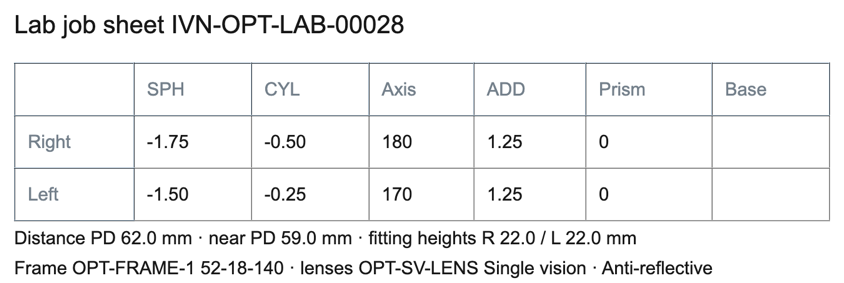
- A lab order made from the prescription, its values copied, with the frame, lenses, coatings and fitting heights.
- Ordered, sent to the lab, ready to collect, collected, with a job sheet to print for the lab.
- A list of the lab orders to chase, the oldest due first.

Frames, lenses and stock
- Frames by model, colour and size, and lenses and contact lenses by type.
- Count stock and receive goods with handheld devices.
- Transfer frames and contact lenses between stores.
Deposits and collection
- Take a deposit at the till when the glasses are ordered, and the rest when they are collected.
- The lab order keeps the till sale it belongs to.
- Returns and exchanges at the same till.
Customers and repeat visits
- Keep each customer's prescriptions, lab orders, purchases and loyalty together.
- Your own e-mail notices can tell customers their glasses are ready, or that an eye test is due.
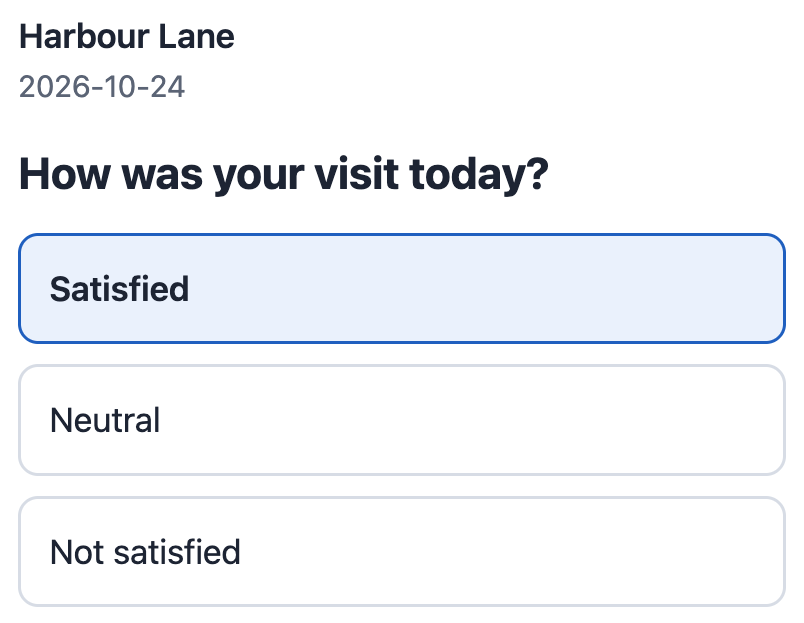
- Ask customers how their visit went, and read the answers by store.
We run the shop. One app carries the eye test.
Your ERP keeps the books. iVendNext runs the stores: the till, frames and stock, prices, loyalty and returns. The optical app adds the prescription and the lab order in the back office and holds the lens rule at the till, and your partner, or your own team, sets it up and builds on it.
One shop for the eye test room, the lab bench and the counter. How it works, step by step
The eye test, the lab and the till, in one app
Apps from the iVendNext App library, each switched on for the stores that need it.
In the App library
Optical prescriptions and lab orders
Your customers' eye prescriptions and the lab's jobs in the back office, with a job sheet for the lab, and lenses sold at the till only against a prescription in date.
Made for optical stores
Post-sale feedback
After the glasses are collected, ask each customer how their visit was, and see the answers store by store.
Serves every industry
Being built
Third-party payer
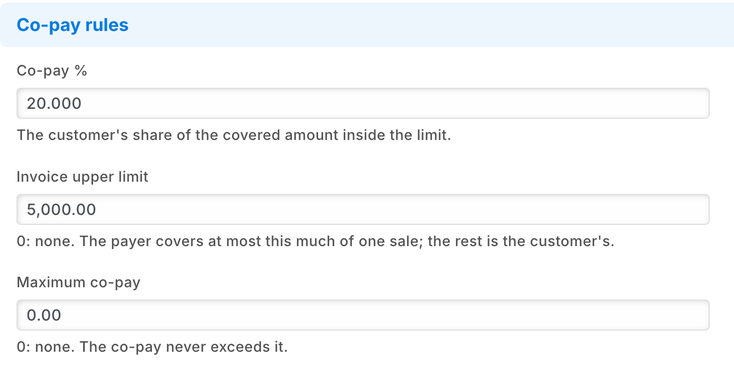
A customer with a vision plan pays only their share at the till; claims are built from the sales and matched to the plan's payment.
Also serves pharmacy, company staff accounts
The library keeps growing, and anything else your partner or your own team can build with the iVendNext partner kit.
Run optical retail with fewer gaps
Give stores and head office one view of prescriptions, lab jobs, stock and sales.
The right lenses for the right customer
- Lens lines checked at Pay
- A prescription that has run out named on screen
- The cashier told what to do next
Every job followed to collection
- Each lab order at its own step
- The orders to chase, oldest due first
- Ready to collect ticked when it is back
One record for each customer
- Prescriptions, lab orders and purchases together
- The same record read in every store
- Repeat visits recognised at the till
Stock where it sells
- Frames and contact lenses visible store by store
- Transfers before a store runs out
- Receipts and counts on the handheld
Your ERP keeps the books. iVendNext runs the stores.
Your ERP knows what the stock is worth. The store knows whose prescription each pair was made to, and where the job is. iVendNext keeps that record beside your ERP, and sends the sales and returns back to it.
Any other ERP, including a regional one, your partner connects with the iVendNext partner kit.
Set up by a partner near you, or your own team
An iVendNext partner in your region sets it up, hosts it where your law asks, and builds what your chain needs on top of our apps. A team with its own developers can do the same: the optical app is free to install, and its code is open to copy and extend.
Your partner supports what it delivers. We support the product.
Connect optical retail across every store
Bring the till, stock, eye prescriptions and lab orders together across every store.
Schedule 1:1 Free ConsultMore for optical stores
Optical POS and retail software FAQs
Straight answers about prescriptions, lab orders, vision plans and your ERP.
What should an optical store POS system manage?
Checkout, stock, transfers and payments, and the work an optical store adds: each customer's eye prescription, the lab job made from it, and a rule that sells lenses only against a prescription in date.
Where are the eye prescriptions kept?
In your own iVendNext, read by the staff you give access. At each Pay, the sale's priced basket goes to a service iVendNext hosts in the United States. It asks your iVendNext only which kind of prescription the customer has and until when, never a lens value, and writes nothing.
Can a vision plan pay part of the sale?
We are building it. The customer will pay their share at the till, the plan's share will be claimed from the plan, and each claim matched to its payment. Your partner will add each plan's terms.
Do we have to replace our ERP?
No. iVendNext is the retail layer beside your ERP. It connects to SAP Business One, SAP S/4HANA, Acumatica, NetSuite and Sage X3, and your partner connects any other ERP with the iVendNext partner kit. Your ERP keeps the books, and iVendNext runs the stores.
Can it send orders to our lab?
Each lab order prints as a job sheet for the lab. Your iVendNext partner, or your own developers, can also send it to your lab's own system and read its status back, through the iVendNext API.
Who sets it up?
An iVendNext partner near you, or your own team. The optical app is in our App library with its own guide.
Talk to us about your optical stores
Tell us how your stores and your lab work. We will show you the till, the optical app, and the iVendNext partner who can set it up near you.
Building retail solutions for optical retailers? Talk to our partner team.
As of 24 October 2026. Screens are from our test system with sample data. iVendNext makes no clinical claim.
