
Integrations Hub
KEEP YOUR SYSTEMS.
KEEP YOUR SYSTEMS.
CONNECT THEM.
CONNECT THEM.
Connect iVendNext to the ERP and web store you already use. Prices, stock, sales and orders match everywhere, and nothing fails silently.
Connect iVendNext to the ERP and web store you already use. Prices, stock, sales and orders match everywhere, and nothing fails silently.
Connect & Watch
Connect once, then
watch every connection
Set up each connection once. After that, the Integrations Hub keeps your systems in
step and shows you anything that needs a person.
Ready-made connectors
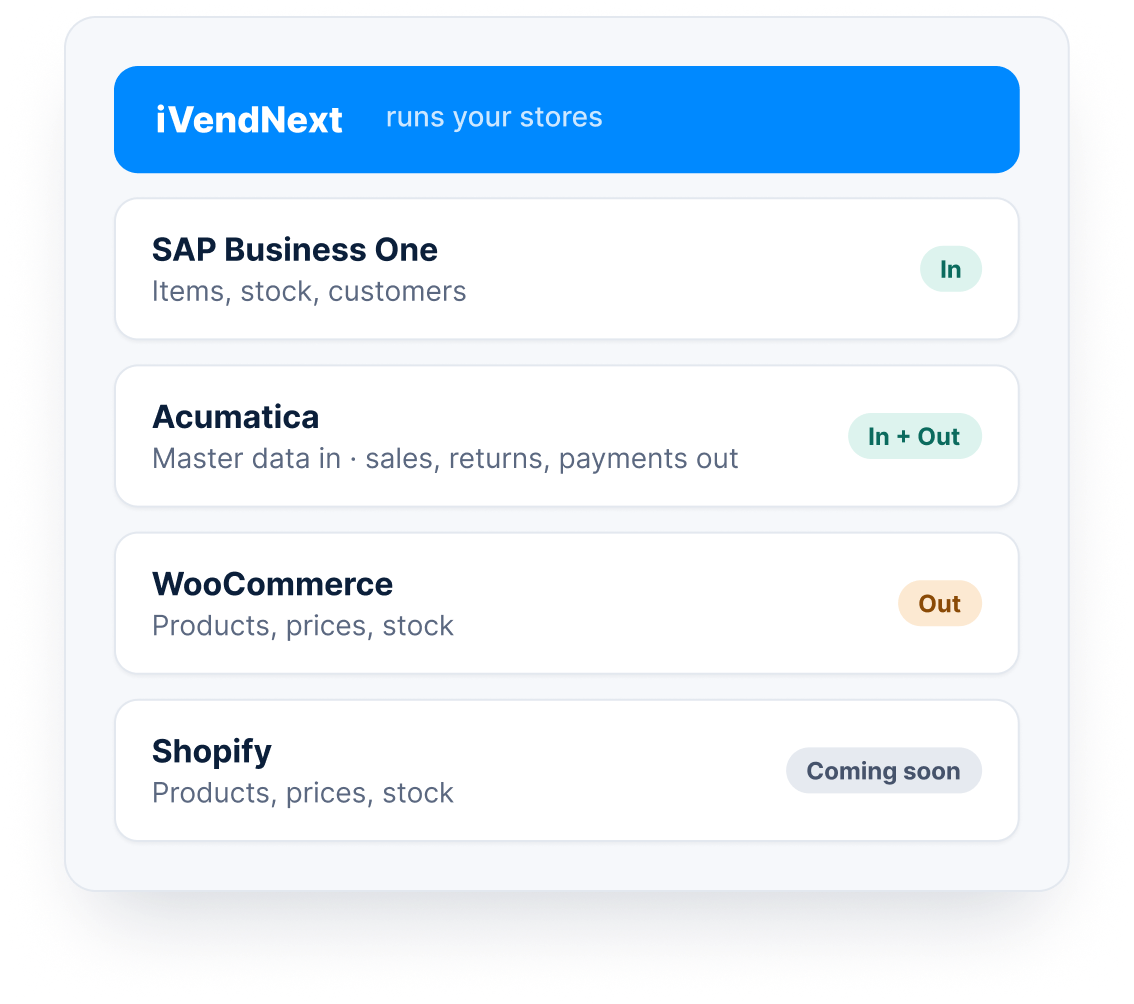
Keep the systems you already paid for and know how to use. Ready-made connectors link iVendNext to SAP Business One, Acumatica and WooCommerce, with Shopify coming soon.
Each connector knows what to send and what to bring back. Your ERP keeps the books it already keeps, and your web store keeps selling online, while iVendNext runs your stores.
SAP Business One: items, stock and customers come in
Acumatica: master data in; sales, returns, payments out
WooCommerce and Shopify: products, prices and stock out

One screen for every connection
The Integrations Hub is a screen in iVendNext Desk. Six counts across the top show what has failed, what is waiting and what needs a decision, for every connection at once.
When every count is zero, everything is in order. An hourly check confirms that each connection still works, and the person in charge gets a notification when something needs them.
Six clear counts, one click from the list behind them
Hourly health check on every connection
Notifications, so nobody has to watch all day
Built for the day something goes wrong
If your web store or ERP is down, changes wait in a queue and are sent when it comes back. If a password expires, the connection shows Sign-in refused, and nothing is thrown away.
If a setting is missing, the record waits and moves on its own once the setting is added. If nobody knows whether a record arrived, the Hub does not send it again blindly, so you get no duplicates.
Changes wait in a queue while a system is down
Missing settings named, with a link to fix them
No blind resends, so no duplicate orders

Differences you decide
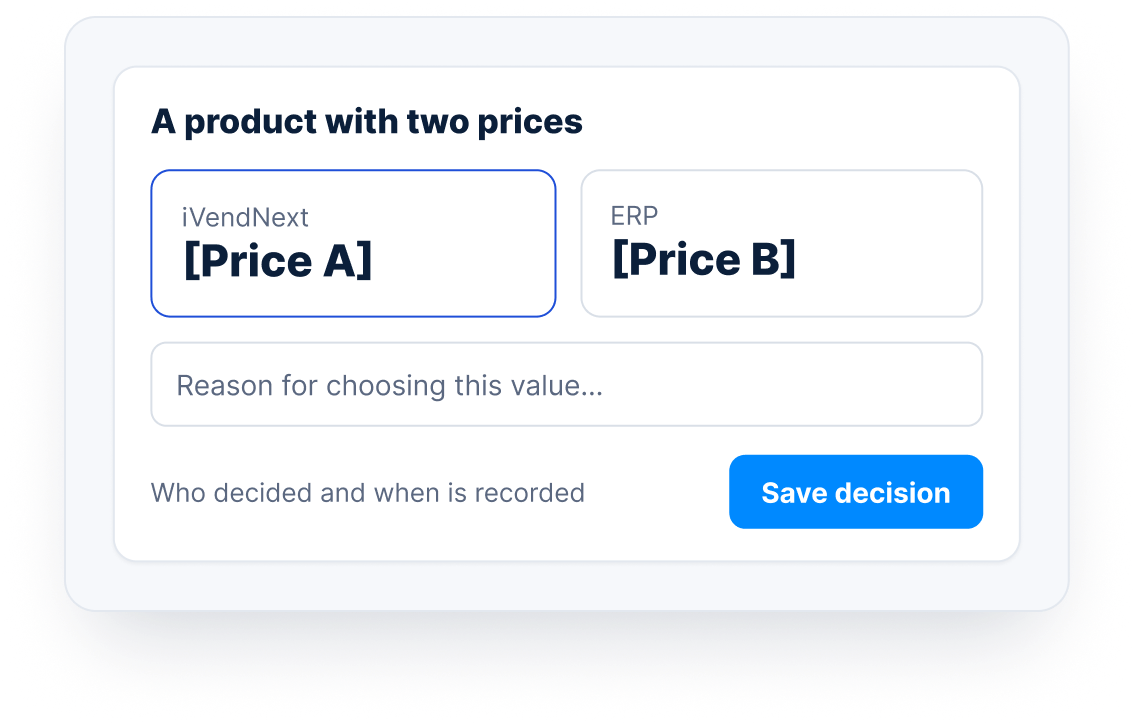
When two systems disagree, for example a product with two prices, the Hub does not guess which one is right. It lists the difference for a person to check.
You pick the right value and give a reason. The Hub records who decided and when. If someone deletes a linked record, the Hub notes it and leaves the other system for you to decide.
Every mismatch listed in one place
A reason, a name and a time for every fix
Nothing deleted in the other system without you
Correct numbers in both systems
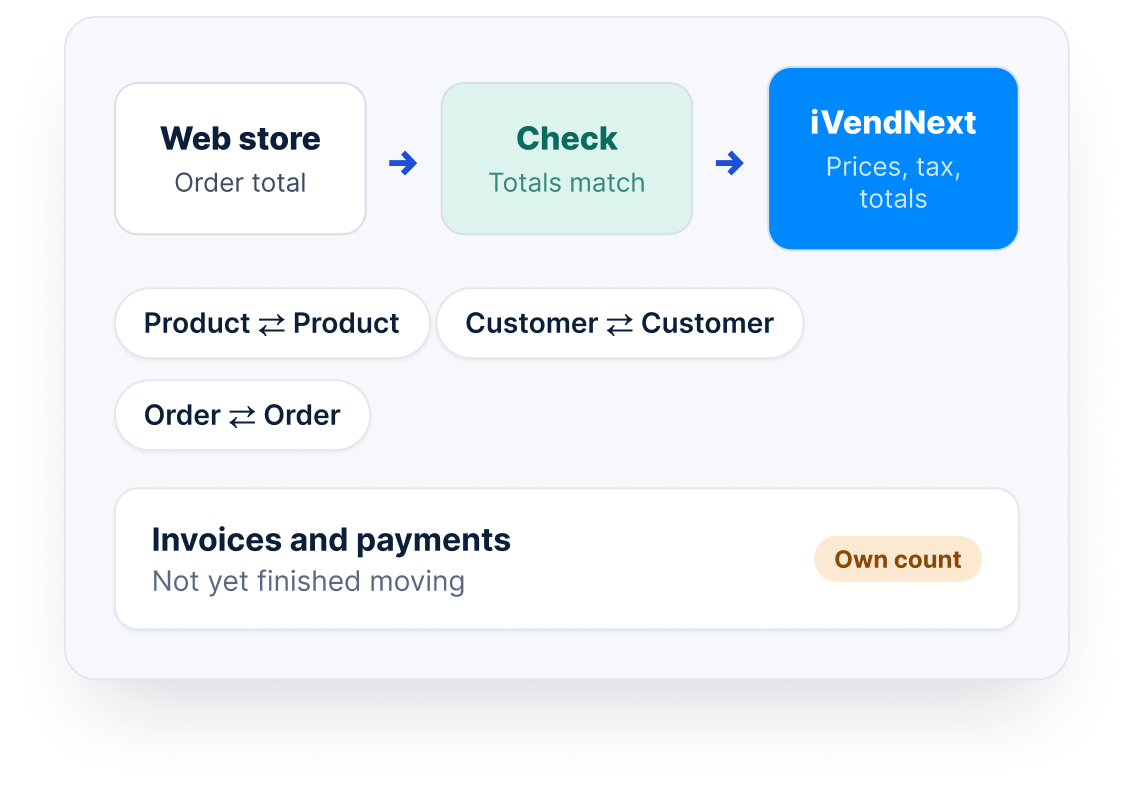
Prices, tax and totals are always worked out by iVendNext, never by the connector. For web orders, the store’s own total is carried across and checked, not worked out again.
Each record stays linked to its match in the other system, so a product, a customer or an order is the same in both. Invoices and payments that have not finished moving have their own count.
One place does the maths
Records linked across both systems
Money records easy to find
Guided setup
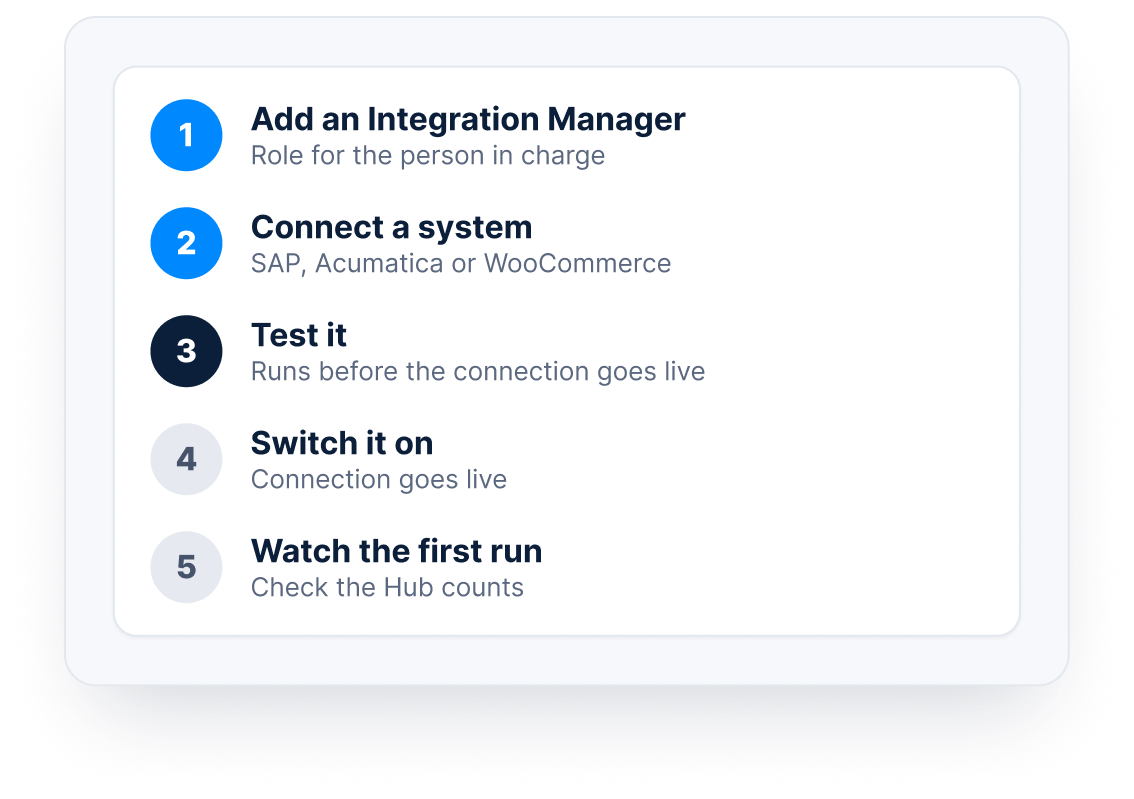
Setup follows five steps on the Hub: add an Integration Manager, connect a system, test it, switch it on, and watch the first run. Each connection is tested before it goes live.
Setup is usually a short project for your iVendNext partner or your IT team. After that, watching the Hub is a simple daily check that anyone with the right role can do.
Five guided steps, in order
A test before every connection goes live
A clear Integration Manager role
Connect & Watch
Connect once, then
watch every connection
Set up each connection once. After that, the Integrations Hub keeps your systems in
step and shows you anything that needs a person.
Ready-made connectors
Keep the systems you already paid for and know how to use. Ready-made connectors link iVendNext to SAP Business One, Acumatica and WooCommerce, with Shopify coming soon.
Each connector knows what to send and what to bring back. Your ERP keeps the books it already keeps, and your web store keeps selling online, while iVendNext runs your stores.
SAP Business One: items, stock and customers come in
Acumatica: master data in; sales, returns, payments out
WooCommerce and Shopify: products, prices and stock out
One screen for every connection
The Integrations Hub is a screen in iVendNext Desk. Six counts across the top show what has failed, what is waiting and what needs a decision, for every connection at once.
When every count is zero, everything is in order. An hourly check confirms that each connection still works, and the person in charge gets a notification when something needs them.
Six clear counts, one click from the list behind them
Hourly health check on every connection
Notifications, so nobody has to watch all day
Built for the day something goes wrong
If your web store or ERP is down, changes wait in a queue and are sent when it comes back. If a password expires, the connection shows Sign-in refused, and nothing is thrown away.
If a setting is missing, the record waits and moves on its own once the setting is added. If nobody knows whether a record arrived, the Hub does not send it again blindly, so you get no duplicates.
Changes wait in a queue while a system is down
Missing settings named, with a link to fix them
No blind resends, so no duplicate orders
Differences you decide
When two systems disagree, for example a product with two prices, the Hub does not guess which one is right. It lists the difference for a person to check.
You pick the right value and give a reason. The Hub records who decided and when. If someone deletes a linked record, the Hub notes it and leaves the other system for you to decide.
Every mismatch listed in one place
A reason, a name and a time for every fix
Nothing deleted in the other system without you
Correct numbers in both systems
Prices, tax and totals are always worked out by iVendNext, never by the connector. For web orders, the store’s own total is carried across and checked, not worked out again.
Each record stays linked to its match in the other system, so a product, a customer or an order is the same in both. Invoices and payments that have not finished moving have their own count.
One place does the maths
Records linked across both systems
Money records easy to find
Guided setup
Setup follows five steps on the Hub: add an Integration Manager, connect a system, test it, switch it on, and watch the first run. Each connection is tested before it goes live.
Setup is usually a short project for your iVendNext partner or your IT team. After that, watching the Hub is a simple daily check that anyone with the right role can do.
Five guided steps, in order
A test before every connection goes live
A clear Integration Manager role
Value Delivered
What changes for your team
Less retyping, fewer surprises, and problems found before customers notice them.
No more retyping
Sales, stock, prices and orders move between systems on their own, so staff stop copying numbers by hand.
Fewer cancelled orders
Stock is shared every few minutes, so your web store is far less likely to sell something that has already gone.
Problems found early
Every failure is kept and shown on one screen, so your team fixes it before it reaches a customer or the books.
Questions
No. You keep the systems you already use. iVendNext connects to them.
Ready-made connectors are available for SAP Business One, Acumatica and WooCommerce. Shopify is coming soon.
Stock is shared every few minutes, not instantly. For most stores this keeps the web store close to what is on the shelf.
Changes wait in a queue and are sent when the system comes back. The Hub shows the connection as Cannot reach it, so someone knows.
Usually your iVendNext partner or your IT team, following five guided steps on the Hub.
Tell us which ERP and web store you use, and we will show you how they connect.
