
iVendNext Handheld

A warehouse scanning app, from the warehouse to the shelf

iVendNext Handheld, the stock app of iVendNext, the open retail platform. This warehouse scanning app puts receiving, moving, counting, picking, packing and delivery on a phone or a rugged scanner, and every movement posts a real stock document to the same ledger your stores sell from.
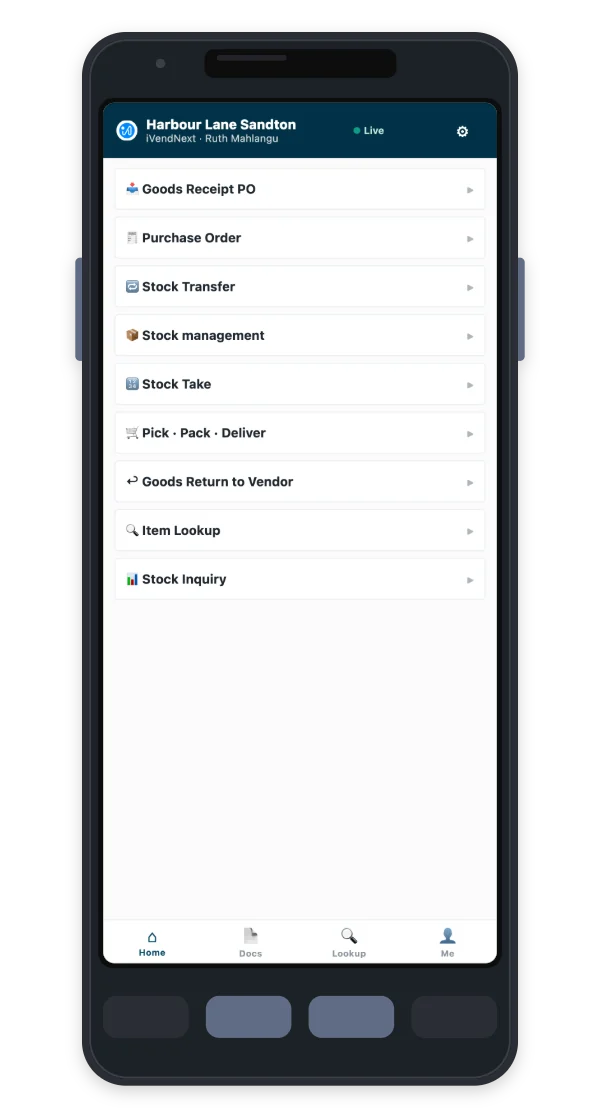
iVendNext Handheld's tasks on a phone: receive against a purchase order, transfer, count, pick, pack and deliver, return to vendor and look up, beside a barcode scanner
Receive, count and pick where the stock sits

Every stock task, scan first

Staff scan as they work, instead of carrying paper back to a desk. Each task posts a standard stock document, so the warehouse, the stores and the office see the same figures.

Receive

Check deliveries in against the purchase order, and capture serial numbers and batches as items arrive.

Move

Transfer stock between stores and warehouses: from the request to the dispatch to the receipt at the other end.

Issue and return

Issue stock, and return goods to suppliers with the quantities checked against what is on hand.

Count

Count at the shelf or in the warehouse, with an optional blind count that hides the expected figure.

Pick, pack and deliver

Pick the order, pack it into cartons with their weights, and post the delivery.

Look up

Scan any code to see the item, its price and its stock in every store, and queue its shelf labels to print.

Receive and move

Receive stock with a handheld scanner, at the door

Scan the purchase order's barcode or pick it from the open orders due today, then scan the items as they come off the van. Quantities, serial numbers and batches are captured on the device, and posting the receipt puts the stock on the shelf in the system the moment it is on the shelf in the store.

Moving stock works the same way: choose the store it leaves and the store it goes to, scan the items, and save the move.
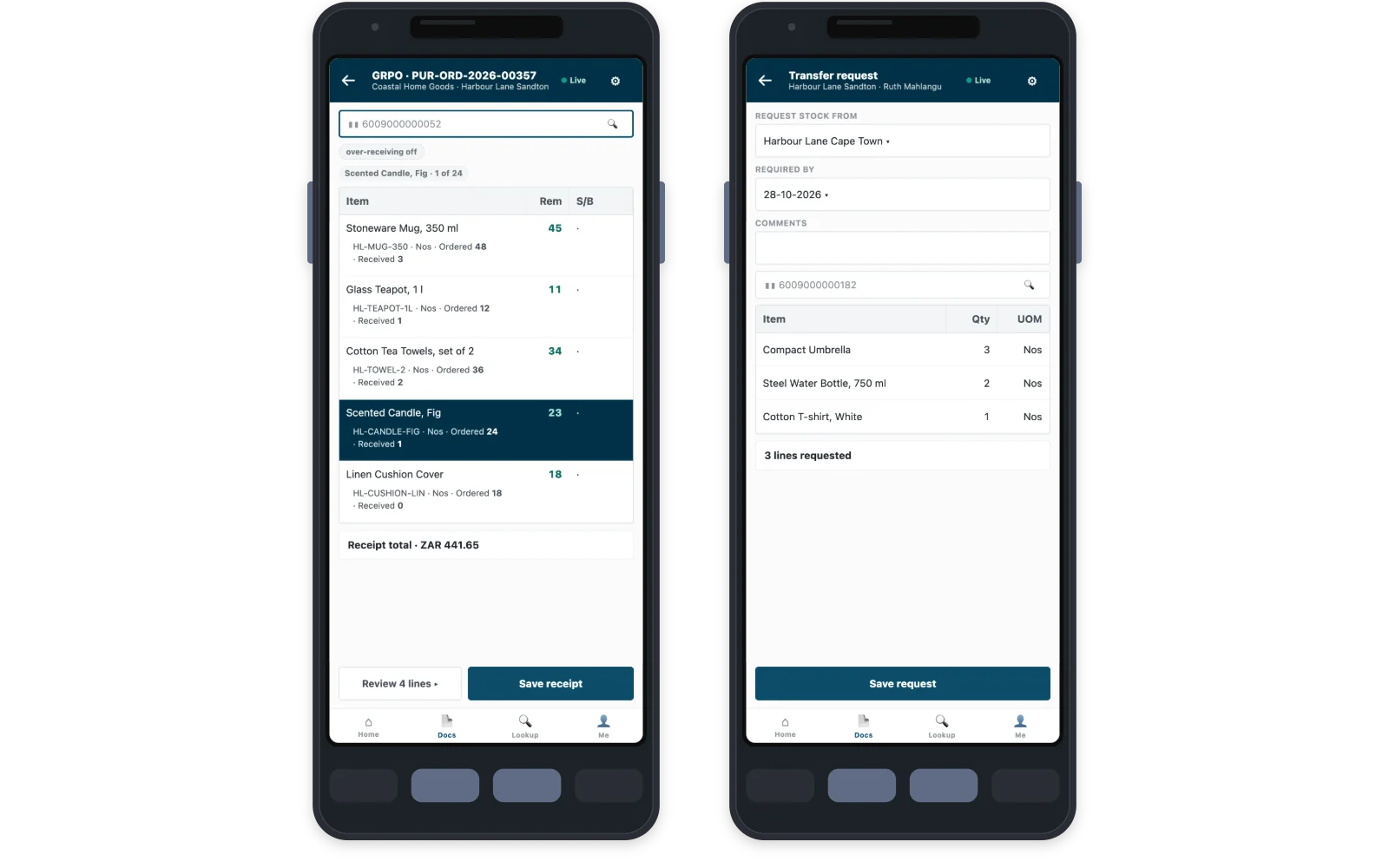
Two phones running iVendNext Handheld: open purchase orders waiting to be received, and a stock move between two stores
Open purchase orders ready to receive, and a move from one store to another.
Count

A stock count app at the shelf

Handheld works as a barcode scanner app for inventory: scan each item, enter what you count, and see the difference from the system as you go. Turn on blind counting and the expected figure stays hidden, so every count is real.

A saved count posts as a stock document that managers review in the back office, without copying figures from paper into another system.
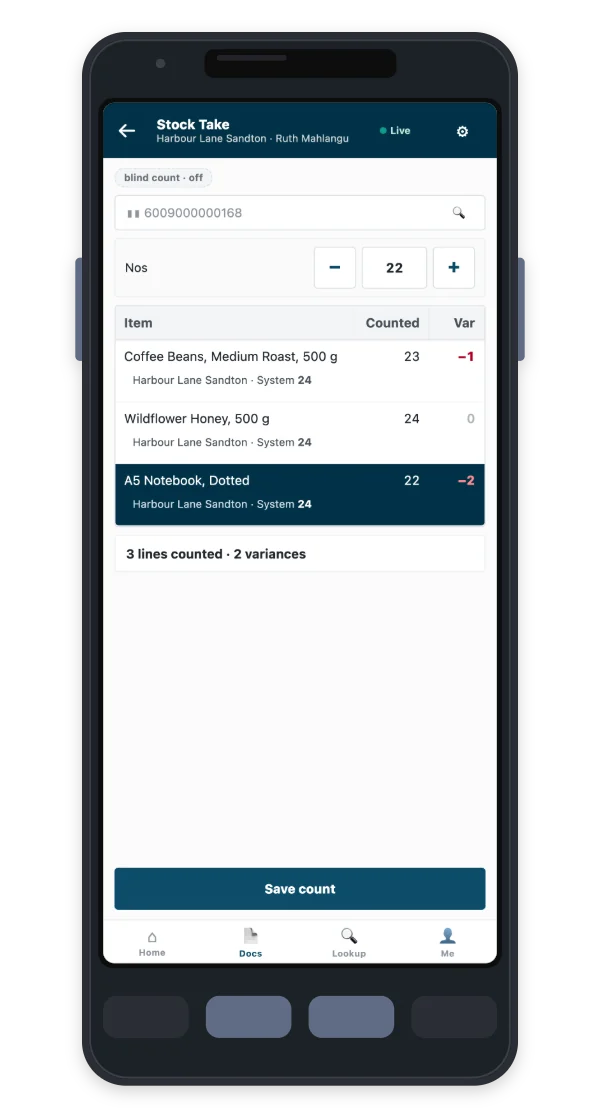
A stock take on iVendNext Handheld: three items counted, each with its counted quantity and the difference from the system
A count in progress, with the difference from the system on each line.
Pick, pack and deliver

From the order to the door, on one device

Open the order's pick task, scan each item to confirm it, then pack the items into cartons with their weights. The delivery posts with its packages and units, so the warehouse and the office always see the same stock.

Sales orders from the back office are picked the same way, whichever channel they came from.

Three phones running iVendNext Handheld: a pick list with every line picked, the items packed into a carton, and the delivery ready to post
Pick, pack and deliver one order, step by step.
One stock ledger

What happens to a delivery after you scan it

Handheld keeps no stock of its own. Every task posts to the stock ledger your stores sell from, so a delivery received at the back door can be sold at the front counter minutes later.

  1. The order. A purchase order is raised in iVendNext or arrives from your ERP.
  2. The receipt. The delivery is scanned in on Handheld against that order and posted.
  3. The stock. The stock ledger updates at once, for every store and every till.
  4. The sale. iVendNext POS sells the new stock on the counter, the tablet or the phone.
  5. The books. Where you run an ERP, the Integrations Hub posts the receipt and the sale to it.
Phone or rugged scanner

The devices that suit each team

Handheld runs in the browser on rugged Android scanners, phones and tablets. Scan with the phone's camera or with a rugged scanner's built-in reader, and give each team the device that suits its work.

Access you control

Two keys on every task

Each person's Handheld access decides which tasks and locations they see, and their normal iVendNext permissions decide what they can post. A task goes through only when both allow it. Managers enrol the devices they trust and remove a lost one straight away.

Stock work, kept apart

Handheld for stock, the POS for selling

Handheld is for stock work and takes no payment. Sales happen on iVendNext POS, and both post to the same stock ledger.

See iVendNext POS
Where stock work matters

Apps and industries for the stockroom

  • Bin locationsWhere stock sits inside a store: aisles, bins and what each bin holds.
  • Pick routeA pick task for the picker you choose, straight from a sales order.
  • Unit codes at the scanScan a unit's own code to sell that unit with its batch.
  • Expiry markdownShort-dated stock marked down by the rules you set.

Hardware and DIY

Large ranges, bins and bulky goods.

Hardware stores

Pharmacy

Batches captured as deliveries arrive.

Pharmacies

Supermarkets

Fresh deliveries, fast counts and short-dated stock.

Supermarkets

Electronics

Serial numbers captured from the delivery to the sale.

Electronics stores
See inventory and buying
Questions

Questions about iVendNext Handheld

What is a warehouse scanning app?

A warehouse scanning app lets staff do stock work by scanning barcodes on a handheld device instead of writing on paper. iVendNext Handheld receives, moves, counts, picks, packs and delivers stock this way, in the warehouse and in the store's back room.

How do I receive a delivery with Handheld?

Scan the purchase order, scan the items as they arrive, and post the receipt. Serial numbers and batches are captured on the way, and the stock is ready to sell in every store as soon as the receipt posts.

Which scanners does it run on?

Handheld runs in the browser on rugged Android scanners, phones and tablets. It scans with a rugged scanner's built-in reader or with the phone's camera.

Does a count update the stock at once?

Yes. A saved count posts at once as a stock document to the ledger the stores sell from, and managers review its differences in the back office.

Does Handheld need a connection?

Yes, Handheld works online, so every task posts to your stock ledger straight away. If the connection drops mid-task, the lines already scanned stay saved on the device, and the operator posts the task when it returns.

Who sets it up, and what does it cost to start?

An iVendNext partner sets up Handheld with your team, and we introduce you to the right partner for your country. The cost depends on your stores, warehouses and devices, so talk to us.

See Handheld in your stockroom

We will walk your team through receiving a delivery against its purchase order, a count at the shelf and a stock move between stores.

Building retail solutions? Talk to our partner team.